Issue Report: Heat Pump and Envelope Package Naming in ComStock 2025 Release 3
Summary of Issue
In ComStock 2025 Release 3, the results and upgrade names for upgrade packages pkg_0003 and pkg_0004 are reversed. This mixup has been addressed in the OEDI upgrades_lookup.json and measure_name_crosswalk.csv files, but the mislabeling remains in the metadata and annual results files on OEDI, and on the Data Viewer.
Status
Impacts ComStock 2025 Release 3 and will be resolved in future dataset releases.
Details
A known issue in ComStock 2025 Release 3 affects the following upgrade packages:
| Measure ID | Upgrade ID | Correct Package Name | Measures Included |
|---|---|---|---|
| pkg_0003 | 56 | Package 3, Package 1 + Package 2 | Wall Insulation, Roof Insulation, New Windows, LED Lighting, HP-RTU, and ASHP-Boiler |
| pkg_0004 | 57 | Package 4, Package 2 with Standard Performance HP RTU | LED Lighting, Standard Performance HP-RTU, and ASHP-Boiler |
The results for these two packages were mislabeled, with the data labeled as pkg_0003 actually reflecting the results of applying pkg_0004 to the building stock, and vice versa. The following sections summarize the impacts on the Open Energy Data Initiative (OEDI) files and Data Viewer for this dataset release.
Note that the package names within the files on OEDI and the Data Viewer interface cannot be changed and remain incorrect.
OEDI Impacts
The upgrades_lookup.json and measure_name_crosswalk.csv files have been corrected and now reflect that that pkg_0003 data is found under Upgrade ID 56 and pkg_0004 results under 57. However, the incorrect names are still present in the metadata and annual results files on OEDI. In the files in the OEDI directories, below, the column “in.upgrade_name” for files under Upgrade ID 56 contains “Package 3, Package 2 with Standard Performance HP RTU,” and for Upgrade ID 57, the column contains “Package 4, Package 1 + Package 2.” These labels are INCORRECT and should not be used to identify the upgrade package applied to the building stock in these files.
OEDI directories affected
- metadata_and_annual_results
- metadata_and_annual_results_aggregates
Data Viewer Impacts
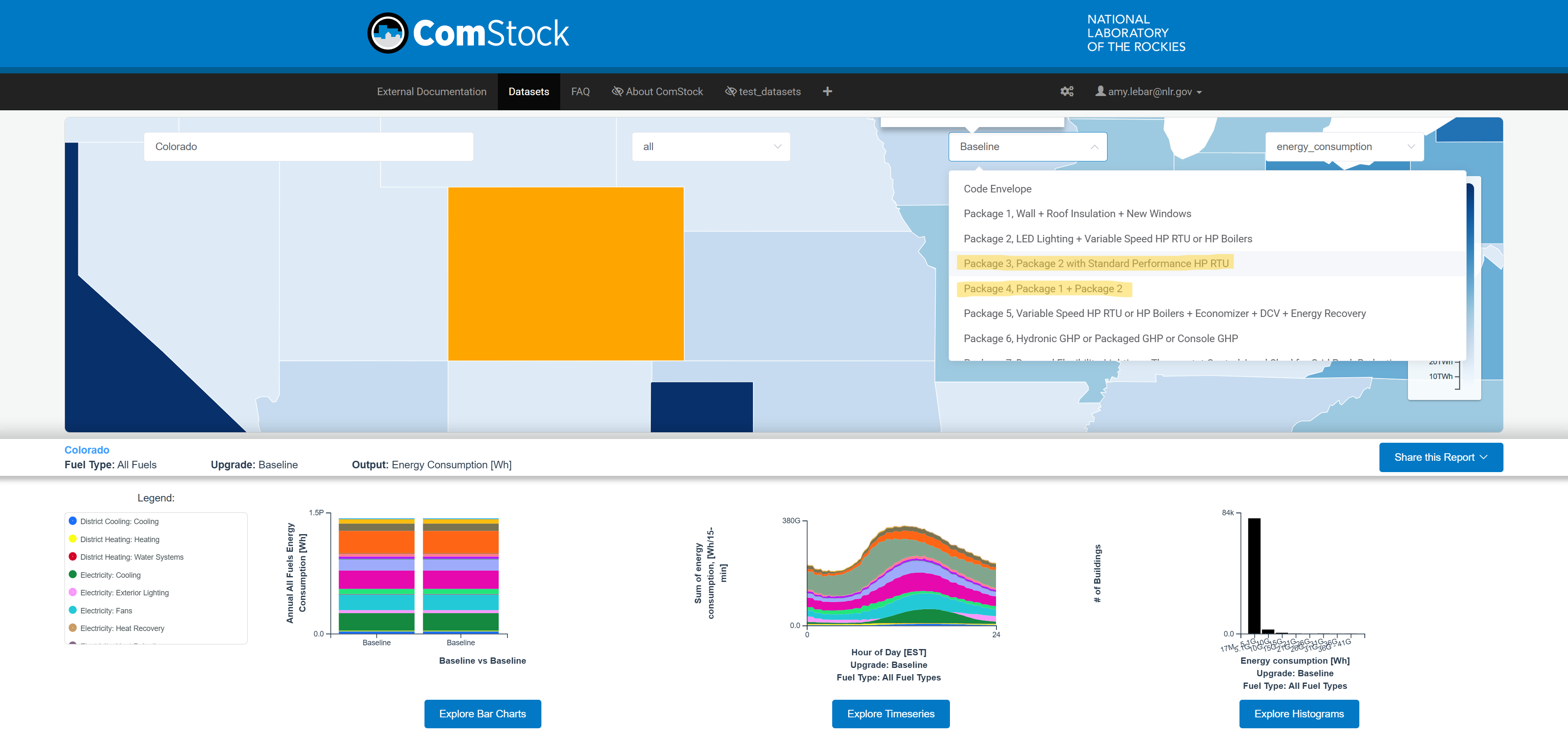
In the dropdown to select which upgrade scenario you are viewing (shown above), selecting “Package 3, Package 2 with Standard Performance HP RTU” will display the results from applying pkg_0004, and “Package 4, Package 1 + Package 2” will show results from pkg_0003.
All Data Viewer views (listed below) are impacted.
- by_state
- by_puma_northeast
- by_puma_midwest
- by_puma_south
- by_puma_west
Recommendations
For data on OEDI, use the upgrades_lookup.json and measure_name_crosswalk.csv to identify which upgrade package corresponds to each upgrade ID. Note that the “in.upgrade_name” field in the metadata and annual results files cannot be fixed and remains incorrect.
For data on the Data Viewer, note that upgrades “Package 3, Package 2 with Standard Performance HP RTU” and “Package 4, Package 1 + Package 2” are reversed. To view, filter, or download data for these packages in the Data Viewer, you will need to select the opposite package name from the dropdown.