Command-Line Interface (CLI) Tools
FuelLib provides command-line tools for plotting, unit conversion, and exporting fuel data.
For detailed usage of each tool, use the --help or -h flag with the command (e.g., fl-plt-comp --help).
Plotting
The plotting CLI provides quick visualization of fuel composition and properties. The following commands are available:
fl-plt-comp -f FUEL_NAME [OPTIONS]      # Plot composition
fl-plt-props -f FUEL_NAME [OPTIONS]     # Plot properties vs temperature
If experimental data is available for the fuel in propertiesData/{fuel_name}.csv, it will be included in the plots for comparison with GCM predictions.
Examples:
fl-plt-comp -f posf10325
fl-plt-props -f posf10264 posf10325 posf10289
fl-plt-props -f my-fuel --fuel-data-dir customFuels -p Density Viscosity
fl-plt-props -f my-fuel --fuel-data-dir customFuels --leg-labels "My Fuel"
Use --leg-labels to supply a literal legend label for each fuel, in the same
order as --fuel-names. Quote labels containing spaces, for example
--leg-labels "Fuel 1" "Fuel 2". Without this option, FuelLib retains its
existing automatic legend formatting.
The first two commands provide the following plots for the specified fuels, while the third command plots only the density and viscosity of a custom fuel:
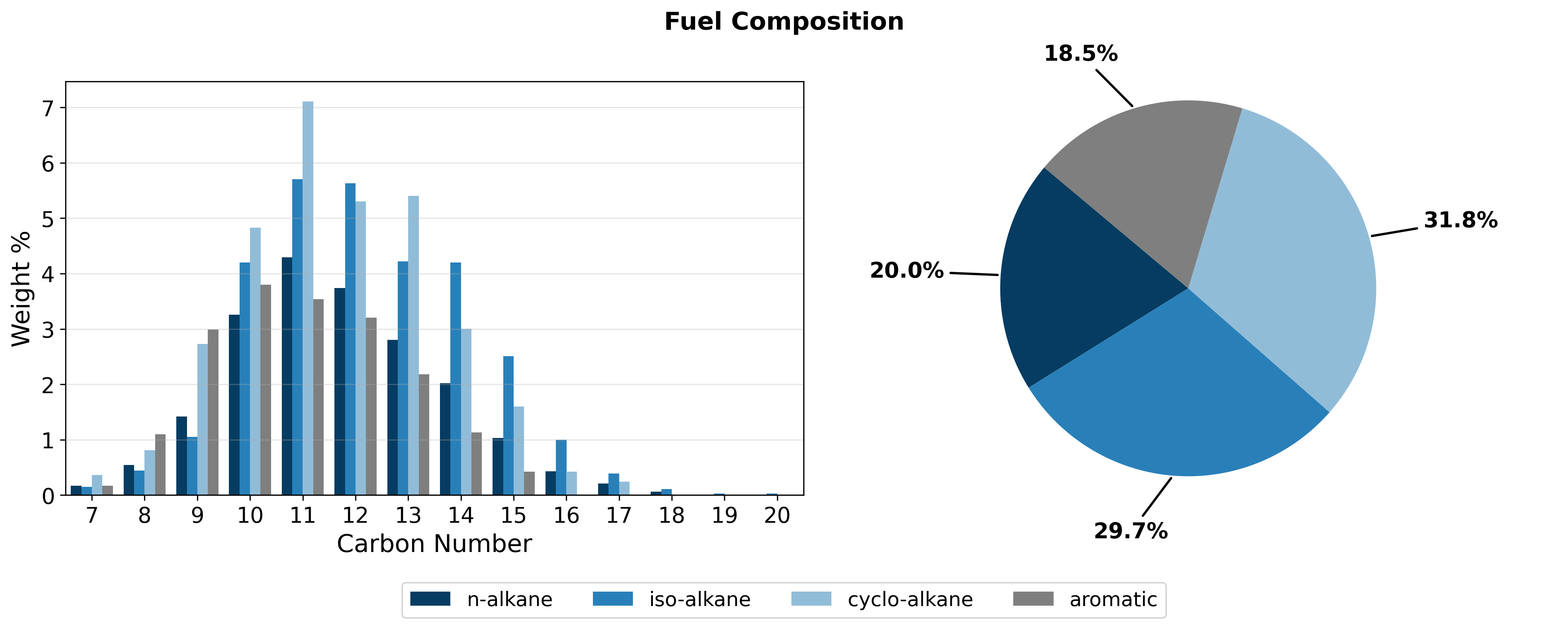
Fig. 5 Compositional information of Jet A (POSF10325).
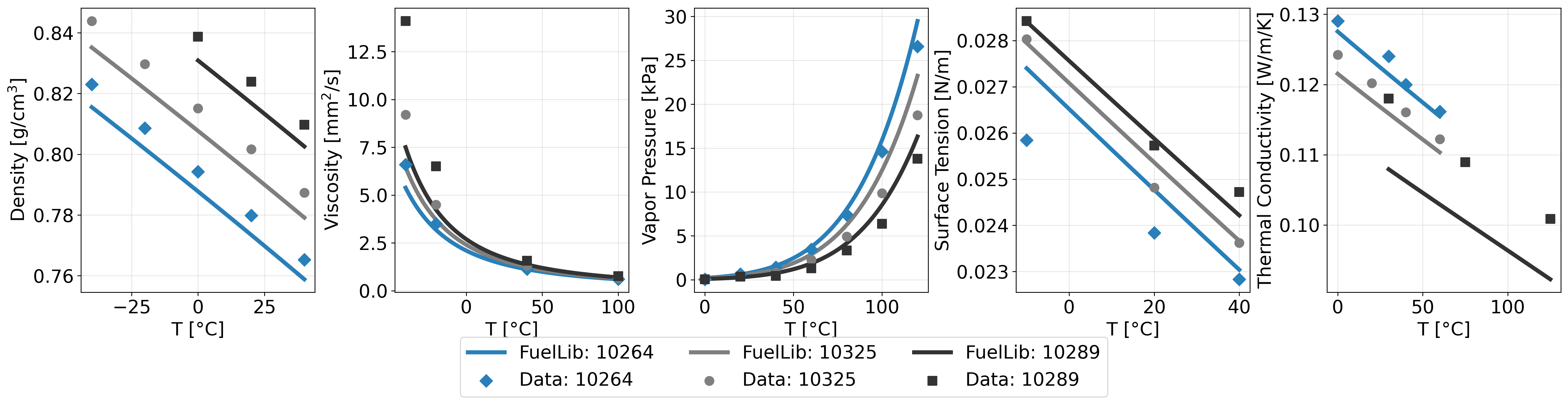
Fig. 6 Properties of conventional jet fuels JP-8 (POSF10264), Jet A (POSF10325), and JP-5 (POSF10289) against data from the Air Force Research Laboratory[1]. Note that the data sets for thermal conductivity are very inconsistent, but they typically show linear decreases in thermal conductivity with temperature.
Unit Conversion Tools
Temperature Conversion
fl-C2K 25                    # Celsius to Kelvin
fl-K2C 298.15                # Kelvin to Celsius
fl-C2F 25                    # Celsius to Fahrenheit
fl-F2C 77                    # Fahrenheit to Celsius
fl-F2K 77                    # Fahrenheit to Kelvin
fl-K2F 298.15                # Kelvin to Fahrenheit
Lennard-Jones Parameters
Convert Lennard-Jones well depth from J/mol to characteristic temperature in Kelvin (for CHEMKIN chemical mechanisms):
fl-eps2K 1000 # epsilon (J/mol) to characteristic temperature (K)
Fuel Management
Quick listing of available fuels:
fl-fuels                   # List fuels shipped with FuelLib
fl-fuels --fuel-data-dir customFuels  # List custom fuels
SMILES Decomposition
Decompose SMILES strings into the Constantinou-Gani groups used in
refGani.csv (default) or the Nannoolal groups used in
refNannoolal.csv:
# Note that SMILES strings with branching or complex structures must be quoted to avoid interpretation issues.
fl-decomp-smiles -s CCc1ccccc1 "CC(C)CCCCC" -n ethylbenzene 2-methylheptane
fl-decomp-smiles -i compounds.csv -o decomposition.csv
fl-decomp-smiles -s CCc1ccccc1 -n ethylbenzene -m nannoolal
Options:
-s/--smiles: one or more SMILES strings to decompose.-n/--name: optionalReference Compoundnames, exactly one for each SMILES string given with--smiles.-i/--input: CSV file with aSMILEScolumn and an optionalReference Compoundcolumn.-m/--method: group-contribution method,gani(default) ornannoolal(case-insensitive).-o/--out: CSV file for the counts. Without it, the nonzero group counts are printed.
Warning
Verify the decompositions before use. A known shortcoming of the gani
method is indene, where the non-aromatic C=C bond is categorized as a
CH group.
Export for CFD
FuelLib provides exporters for generating fuel property files for use in CFD simulations. The following commands are available:
fl-export-pele -f FUEL_NAME [OPTIONS]        # PelePhysics
fl-export-converge -f FUEL_NAME [OPTIONS]    # CONVERGE
Additional information and examples for using the exporters can be found in the Exporting Properties for Pele and Exporting Properties for CONVERGE tutorials.
Developer Tools
Tools for development and documentation maintenance:
fl-build-docs       # Build Sphinx documentation
fl-clean-docs       # Clean generated documentation
fl-format           # Format, lint, and type-check Python code (ruff format, ruff check --fix, ty check)