
Temperature Scenario#
# if running on google colab, uncomment the next line and execute this cell to install the dependencies and prevent "ModuleNotFoundError" in later cells:
# !pip install pvdeg
import pvdeg
import os
# This information helps with debugging and getting support :)
import sys
import platform

print("Working on a ", platform.system(), platform.release())
print("Python version ", sys.version)
print("pvdeg version ", pvdeg.__version__)
Working on a  Linux 6.17.0-1022-azure
Python version  3.11.16 (main, Aug 13 2026, 02:46:14) [GCC 13.3.0]
pvdeg version  0.1.dev1+g5168b02eb
Adding Modules and Pipeline Jobs (Run Functions on Scenario Object)#
Material: OX003 corresponds to a set of EVA material parameters from the default file O2Permeation.json in the pvdeg/data directory. Look in these files to see available options.
scene_temp = pvdeg.Scenario(
    name="temperature and degradation",
    api_key="DEMO_KEY",
    email="user@mail.com",
)

scene_temp.addLocation(
    lat_long=(25.783388, -80.189029),
)

# this module will be overwritten because another with the same name is added afterwards
scene_temp.addModule(module_name="sapm_1", temperature_model="sapm")

scene_temp.addModule(
    module_name="sapm_1",
    racking="open_rack_glass_polymer",
    materials="OX003",
    temperature_model="sapm",
    irradiance_kwarg={"azimuth": 120, "tilt": 30},
    model_kwarg={"irrad_ref": 1100},
)

scene_temp.addModule(
    module_name="pvsyst_1",
    racking="freestanding",
    materials="OX003",
    temperature_model="pvsyst",
    irradiance_kwarg={"azimuth": 180, "tilt": 0},
    model_kwarg={"module_efficiency": 0.15},
)
scene_temp.addModule(
    module_name="sapm_2",
    racking="open_rack_glass_polymer",
    materials="OX003",
    temperature_model="sapm",
    irradiance_kwarg={"azimuth": 120, "tilt": 30},
    model_kwarg={"irrad_ref": 1000},
)
scene_temp.addModule(
    module_name="sapm_3",
    racking="open_rack_glass_polymer",
    materials="OX003",
    temperature_model="sapm",
    irradiance_kwarg={"azimuth": 180, "tilt": 0},
    model_kwarg={"irrad_ref": 1000},
)

scene_temp.addModule(
    module_name="pvsyst_2",
    racking="freestanding",
    materials="OX003",
    temperature_model="pvsyst",
    irradiance_kwarg={"azimuth": 180, "tilt": 0},
    model_kwarg={"module_efficiency": 0.2},
)

scene_temp.addJob(
    func=(pvdeg.temperature.temperature, {"cell_or_mod": "cell"}),
)

scene_temp.addJob(
    func=(pvdeg.degradation.vantHoff_deg, {"I_chamber": 1000, "temp_chamber": 25}),
)

scene_temp.addJob(
    func=(pvdeg.degradation.vantHoff_deg, {"I_chamber": 1000, "temp_chamber": 30}),
)

scene_temp.addJob(
    func=pvdeg.degradation.IwaVantHoff,
)
Column "relative_humidity" not found in DataFrame. Calculating...
/opt/hostedtoolcache/Python/3.11.16/x64/lib/python3.11/site-packages/pvdeg/scenario.py:422: UserWarning: WARNING - Module already found by name "sapm_1"
  warnings.warn(f'WARNING - Module already found by name "{module_name}"')
/opt/hostedtoolcache/Python/3.11.16/x64/lib/python3.11/site-packages/pvdeg/scenario.py:423: UserWarning: Module will be replaced with new instance.
  warnings.warn("Module will be replaced with new instance.")
'YCLUW'
Run and View Scenario Results#
scene_temp.run()

scene_temp
# noqa
self.name: temperature and degradation
# noqaself.gids: [1060499]
self.email: user@mail.com
self.api_key: DEMO_KEY
self.results
# noqa
► pvsyst_1
# noqa
► pvsyst_2
# noqa
► sapm_1
# noqa
► sapm_2
# noqa
► sapm_3
self.pipeline
# noqa
► # noqa temperature, #ZFDDU # noqa
# noqa
► # noqa vantHoff_deg, #MTIRF # noqa
# noqa
► # noqa vantHoff_deg, #LUKEH # noqa
# noqa
► # noqa IwaVantHoff, #YCLUW # noqa
self.modules
# noqa
► sapm_1
# noqa
► pvsyst_1
# noqa
► sapm_2
# noqa
► sapm_3
# noqa
► pvsyst_2
self.weather_data
# noqa
► # noqa Weather Data
self.meta_data
{'Source': 'NSRDB', 'Location ID': '1060499', 'City': '-', 'State': '-', 'Country': '-', 'Clearsky DHI Units': 'w/m2', 'Clearsky DNI Units': 'w/m2', 'Clearsky GHI Units': 'w/m2', 'Dew Point Units': 'c', 'DHI Units': 'w/m2', 'DNI Units': 'w/m2', 'GHI Units': 'w/m2', 'Solar Zenith Angle Units': 'Degree', 'Temperature Units': 'c', 'Pressure Units': 'mbar', 'Relative Humidity Units': '%', 'Precipitable Water Units': 'cm', 'Wind Direction Units': 'Degrees', 'Wind Speed Units': 'm/s', 'Cloud Type -15': 'N/A', 'Cloud Type 0': 'Clear', 'Cloud Type 1': 'Probably Clear', 'Cloud Type 2': 'Fog', 'Cloud Type 3': 'Water', 'Cloud Type 4': 'Super-Cooled Water', 'Cloud Type 5': 'Mixed', 'Cloud Type 6': 'Opaque Ice', 'Cloud Type 7': 'Cirrus', 'Cloud Type 8': 'Overlapping', 'Cloud Type 9': 'Overshooting', 'Cloud Type 10': 'Unknown', 'Cloud Type 11': 'Dust', 'Cloud Type 12': 'Smoke', 'Fill Flag 0': 'N/A', 'Fill Flag 1': 'Missing Image', 'Fill Flag 2': 'Low Irradiance', 'Fill Flag 3': 'Exceeds Clearsky', 'Fill Flag 4': 'Missing CLoud Properties', 'Fill Flag 5': 'Rayleigh Violation', 'Surface Albedo Units': 'N/A', 'Version': '4.1.4.dev4+g4fed29ccf.d20260425', 'latitude': 25.77, 'longitude': -80.18, 'altitude': 7, 'tz': -5, 'wind_height': 2}All attributes can be accessed by the names shown above.
scene_temp.dump()
Plotting and Extracting Results#
These methods are independent of one another (i.e. you do not need to extract before plotting but both are shown below.)
import datetime

t0 = datetime.datetime(1970, 1, 1, 0, 0)
tf = datetime.datetime(1970, 1, 1, 23, 59)

# scene_temp.results is keyed by module_name, whose values are dicts keyed by
# job_id. Grab the first job_id from any module to use as the ('function', ...)
# target for extract/plot.
first_module_results = next(iter(scene_temp.results.values()))
first_job_id = next(iter(first_module_results.keys()))

temp_df = scene_temp.extract(
    ("function", first_job_id), tmy=True, start_time=t0, end_time=tf
)
display(temp_df)
| sapm_1 | pvsyst_1 | sapm_2 | sapm_3 | pvsyst_2 | |
|---|---|---|---|---|---|
| 1970-01-01 00:30:00-05:00 | 24.100000 | 24.100000 | 24.100000 | 24.100000 | 24.100000 |
| 1970-01-01 01:30:00-05:00 | 24.100000 | 24.100000 | 24.100000 | 24.100000 | 24.100000 |
| 1970-01-01 02:30:00-05:00 | 24.000000 | 24.000000 | 24.000000 | 24.000000 | 24.000000 |
| 1970-01-01 03:30:00-05:00 | 24.000000 | 24.000000 | 24.000000 | 24.000000 | 24.000000 |
| 1970-01-01 04:30:00-05:00 | 24.000000 | 24.000000 | 24.000000 | 24.000000 | 24.000000 |
| 1970-01-01 05:30:00-05:00 | 23.900000 | 23.900000 | 23.900000 | 23.900000 | 23.900000 |
| 1970-01-01 06:30:00-05:00 | 24.000000 | 24.000000 | 24.000000 | 24.000000 | 24.000000 |
| 1970-01-01 07:30:00-05:00 | 27.565173 | 25.680763 | 27.609768 | 25.351273 | 25.611306 |
| 1970-01-01 08:30:00-05:00 | 30.664107 | 29.424296 | 30.749572 | 28.055360 | 29.169925 |
| 1970-01-01 09:30:00-05:00 | 37.165736 | 35.939976 | 37.348417 | 32.527241 | 35.319977 |
| 1970-01-01 10:30:00-05:00 | 38.435542 | 39.348967 | 38.632696 | 34.996477 | 38.540204 |
| 1970-01-01 11:30:00-05:00 | 38.956198 | 41.350708 | 39.151817 | 36.773449 | 40.435961 |
| 1970-01-01 12:30:00-05:00 | 36.017173 | 39.166766 | 36.164367 | 35.464698 | 38.386368 |
| 1970-01-01 13:30:00-05:00 | 37.930301 | 42.477199 | 38.099683 | 38.244043 | 41.502070 |
| 1970-01-01 14:30:00-05:00 | 34.757705 | 40.028646 | 34.881087 | 36.627189 | 39.191667 |
| 1970-01-01 15:30:00-05:00 | 30.471796 | 35.669583 | 30.537436 | 33.430788 | 35.077254 |
| 1970-01-01 16:30:00-05:00 | 26.340354 | 30.203175 | 26.355217 | 29.220392 | 29.908870 |
| 1970-01-01 17:30:00-05:00 | 25.122945 | 25.319565 | 25.127107 | 25.222107 | 25.289002 |
| 1970-01-01 18:30:00-05:00 | 24.700000 | 24.700000 | 24.700000 | 24.700000 | 24.700000 |
| 1970-01-01 19:30:00-05:00 | 24.600000 | 24.600000 | 24.600000 | 24.600000 | 24.600000 |
| 1970-01-01 20:30:00-05:00 | 24.600000 | 24.600000 | 24.600000 | 24.600000 | 24.600000 |
| 1970-01-01 21:30:00-05:00 | 24.500000 | 24.500000 | 24.500000 | 24.500000 | 24.500000 |
| 1970-01-01 22:30:00-05:00 | 24.500000 | 24.500000 | 24.500000 | 24.500000 | 24.500000 |
| 1970-01-01 23:30:00-05:00 | 24.400000 | 24.400000 | 24.400000 | 24.400000 | 24.400000 |
scene_temp.plot(
    ("function", first_job_id),
    tmy=True,
    start_time=t0,
    end_time=tf,
    title="single day cell temperature",
)
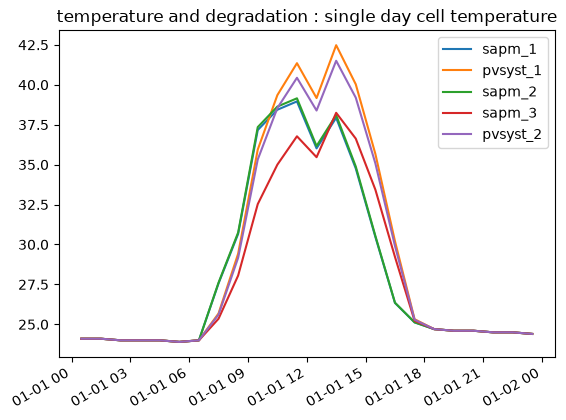
(<Figure size 640x480 with 1 Axes>,
 <Axes: title={'center': 'temperature and degradation : single day cell temperature'}>)
Create a Copy of a Scenario#
from pathlib import Path

parent_dir = Path(pvdeg.PVDEG_DIR).parent
new_path = parent_dir / "tutorials" / "data" / "temperature_and_degradation.json"

copy = pvdeg.scenario.Scenario.load_json(
    file_path=str(new_path),
    email="user@mail.com",
    api_key="DEMO_KEY",
)

copy
---------------------------------------------------------------------------
FileNotFoundError                         Traceback (most recent call last)
Cell In[9], line 6
      2
      3 parent_dir = Path(pvdeg.PVDEG_DIR).parent
      4 new_path = parent_dir / "tutorials" / "data" / "temperature_and_degradation.json"
      5
----> 6 copy = pvdeg.scenario.Scenario.load_json(
      7     file_path=str(new_path),
      8     email="user@mail.com",
      9     api_key="DEMO_KEY",

File /opt/hostedtoolcache/Python/3.11.16/x64/lib/python3.11/site-packages/pvdeg/scenario.py:913, in Scenario.load_json(cls, file_path, email, api_key)
    905 @classmethod
    906 def load_json(
    907     cls,
   (...)    910     api_key: Optional[str] = None,
    911 ):
    912     """Import scenario dictionaries from existing 'scenario.json' file."""
--> 913     with open(file_path, "r") as f:
    914         data = json.load(f)
    915     name = data["name"]

FileNotFoundError: [Errno 2] No such file or directory: '/opt/hostedtoolcache/Python/3.11.16/x64/lib/python3.11/site-packages/tutorials/data/temperature_and_degradation.json'