Quick Start Guide to T3CO
A total-cost analysis is only as good as its inputs. Generating T3CO results requires equal parts of investment in inputs gathering as it is in running the tool. To make things easier, we provide 500+ demo scenarios for the user to choose from to run T3CO.
Inputs
T3CO contains three main input files and several auxiliary files that are referenced in the main files for different purposes.
Vehicle, Scenario, and Config
The main input files are the Vehicle, Scenario, and Config. T3CO provides users with demo input files to get started. One or more Vehicle-Scenario pair selections are necessary to run T3CO:
- Vehicle contains sets of FASTSim vehicle input parameters that define the powertrain and vehicle dynamics of the selected Vehicle-Scenario pair. Each entry in the Vehicle file is called a "Vehicle Model" and is referenced using
vehicle.selectionas a key. [Demo Vehicles] - Scenario contains cost, infrastructure, and optimization related input parameters that define a certain scenario. Each entry in the Scenario file is called a "Scenario Model" and is referenced using
scenario.selectionas a key. [Demo Scenarios] - Config contains easy ways to manage T3CO model settings and to save the inputs needed to run a set of selections of Vehicle-Scenario pairs. It also contains paths to various input files and some Scenario parameter overrides to be used globally on all selections. Users can also specify a path to the output directory in which T3CO results need to be saved. Each entry in the Config file refers to an "Analysis" and is accessed using
config.analysis_id[Demo Analyses]
Note that scenario.selection and vehicle.selection are expected by the tool to be the same for a chosen Vehicle-Scenario pair, i.e., a row on the Scenario file has a corresponding row on the Vehicle file with the same selection key. The config.selections attribute accepts a list of "selection" (that refers to both scenario.selection and vehicle.selection) and is used to fetch the desired set of inputs to run.
Auxiliary Inputs
The auxiliary input files in the t3co/resources/auxiliary/ folder include FuelPrices.csv, ResidualValues.csv, AeroDragImprovementCostCurve.csv, LightweightImprovementCostCurve.csv, and EngineEffImprovementCostCurve.csv. These files contain important cost and model assumptions that are necessary to run different aspects of the T3CO cost models. Users can select the default auxiliary input files and choose the relevant set of assumptions. They can also add new entries to these files, or create their own auxiliary input files and mention the new paths in the Config file.
Running T3CO
After checking the inputs and creating/modifying an "Analysis" on the Config file, the next step is to execute the models. The t3co/cli/sweep.py module is the main script that needs to be run to perform a TCO analysis. And the most effective way to run the sweep module is to call a specific "Analysis" from the Config file using the config.analysis_id key.
Running the Sweep Module from a PyPI-installed T3CO
The easiest way to run the t3co.cli.sweep module is to use a local copy of the demo input files. If the install_t3co_demo_inputs command is used to copy demo_inputs to your local directory after installing from PyPI, run the t3co.cli.sweep module from any directory.
python -m t3co.cli.sweep --analysis-id=0 --config=<path/to/demo_inputs/T3COConfig.csv>
--config to the T3COConfig.csv file path and --analysis-id to the desired config.analysis_id (either an existing one or a newly added "Analysis" in the demo_inputs/T3COConfig.csv file. Default = 0).
Running Sweep Module from a Cloned Github repo
For running config.analysis_id=0 (or a user desired "Analysis") from the Demo Config file on a cloned GitHub repo, run these commands from the parent directory:
python -m t3co.cli.sweep --analysis-id=0
Running T3CO in Batch Mode (using multiprocessing)
The user can run T3CO in a "Batch Mode", which may be useful when running a large number of Vehicle-Scenario pairs or a large number of drivecycles or both. T3CO provides a demo analysis (config.analysis_id=3 in the sample T3COConfig.csv file) that runs the Batch Mode for a folder of multiple input drivecycles.
python -m t3co.cli.sweep --analysis-id=3 --run-multi
The Batch Mode allows T3CO to run parallel analyses utilizing multiple processors (or CPU cores) denoted by CLI argument --n-processors(defaults to 9). Adjust this number accordingly. To get the fastest run time, close other processor intensive programs running on your computer and assign --n-processors as one or two less than the max number of cores.
When a folder path is provided in the T3COConfig.csv file (config.drive_cycle) containing "n" number of valid drivecycles, T3CO generates "n" scenarios for each Vehicle selections mentioned in config.selections with the scenario.drive_cycle populated with each of the "n" drivecycles. For Vehicle selection "1" in config.selections, the generated selection numbers are denoted by "1_000" for the first drivecycle, "1_001" for the second drivecycle, and so on.
Running T3CO Demo
T3CO presents a demo file (src/t3co/demos/demo.py) for generating a TCOCalc for a specific year and a Ledger object for a given vehicle, scenario, and energy inputs. It showcases the modularity of the tool and allows the user to also download the results as a JSON or CSV file.
Other Command Line Interface arguments
Use the command below to get a list of all CLI arguments:
python -m t3co.cli.sweep --help
EIA Fuel Price Projections
T3CO can fetch fuel price projections directly from the EIA Annual Energy Outlook (AEO) API. This replaces the static FuelPrices.csv data with the latest AEO projections for a region matching the provided US zipcode.
Setup:
1. Get a free EIA API key from eia.gov/opendata/register.php
2. Add it to a .env file in your project root:
T3CO_EIA_API_KEY=your_api_key_here
Usage: Set the region column in T3COConfig.csv to a 5-digit US zipcode. T3CO will auto-discover the latest AEO year, resolve the zipcode to a US Census division, and fetch fuel prices for that region.
python -m t3co.cli.sweep --analysis-id=5
The same zipcode-based resolution also works at the Scenario level — if a scenario's region field contains a zipcode and the config didn't already resolve one, T3CO fetches EIA data for that scenario.
To override the AEO year or scenario (instead of using the latest):
python -m t3co.cli.sweep --analysis-id=5 --eia-aeo-year=2023 --eia-aeo-case=aeo2022ref
The eia_fuel_prices toggle in cost_toggles.json controls whether EIA lookups are enabled (default: true). If the toggle is false or no zipcode is provided, T3CO falls back to the static FuelPrices.csv.
Fuel Price Overrides
For fuel-price sensitivity work, --fuel-prices-json accepts a JSON string or file path with zipcode and fuel_prices keys. T3CO uses the installed zipcodes package to resolve that ZIP code into the base fuel-price region before cloning and overriding the matching rows in FuelPrices.csv.
python -m t3co.cli.sweep \
  --analysis-id=0 \
  --fuel-prices-json='{"zipcode":"80302","fuel_prices":{"diesel_dol_per_gal":{"2025":4.25}}}'
Selected CLI arguments related to EIA fuel price data fetching:
  --eia-api-key EIA_API_KEY
                        EIA API key (prefer setting T3CO_EIA_API_KEY in .env file instead).
  --eia-aeo-year EIA_AEO_YEAR
                        AEO publication year to query (e.g. '2023', '2025').
                        Default: auto-discover latest.
  --eia-aeo-case EIA_AEO_CASE
                        AEO scenario case ID (e.g. 'aeo2023ref').
                        Default: auto-discover reference case.
For the full list of CLI arguments, run:
python -m t3co.cli.sweep --help
T3CO Results
After running the analysis, T3CO stores the results .CSV file in the directory specified by config.dst_dir (or the CLI argument --dst-dir).
The results file includes a comprehensive list of Ledger Outputs that were calculated by the various T3CO Modules. In addition to the T3CO outputs, all the Vehicle input parameters (denoted by a prefix: input_vehicle_value_), Scenario input parameters(denoted by a prefix: scenario_), and Config parameters (denoted by a prefix: config_) are also present in the results file. When the optional optimization module is run, the optimized vehicle parameters are also listed ((denoted by a prefix: optimized_vehicle_value_)) instead of NaN values for non-optimization runs.
T3CO Visualization
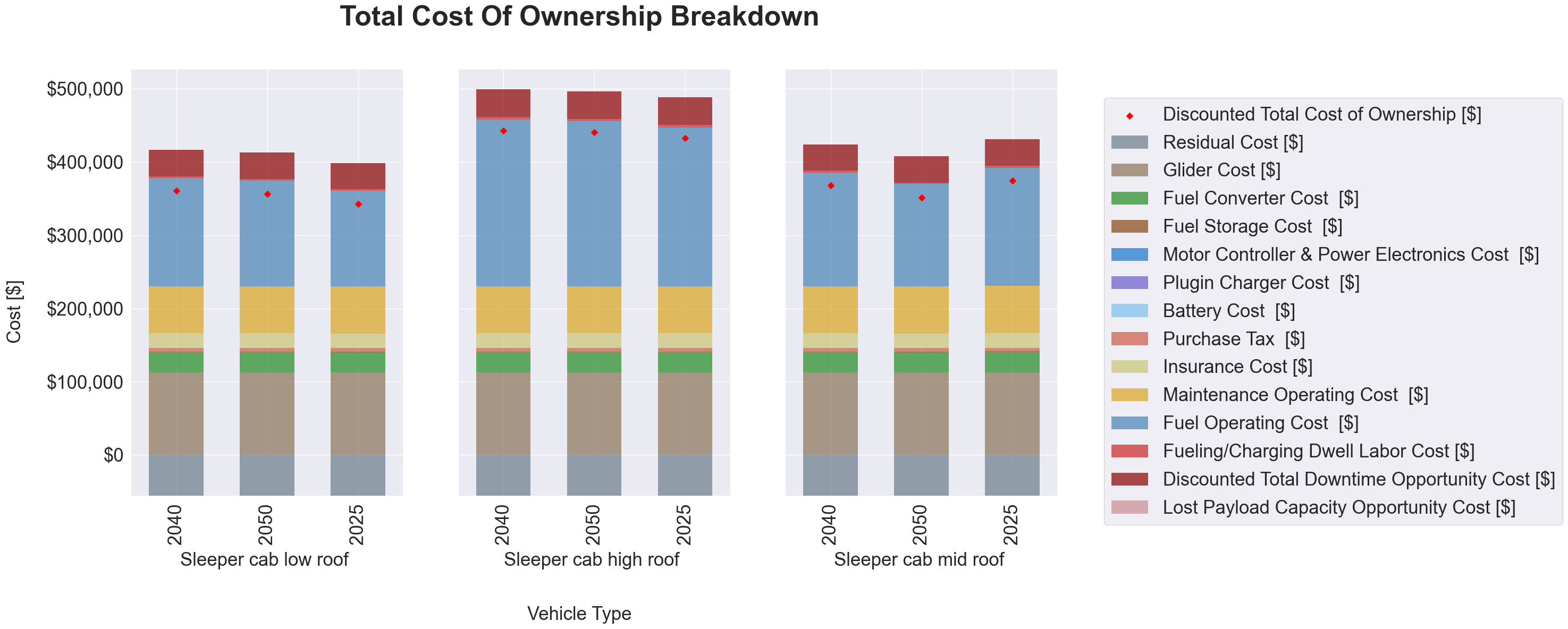
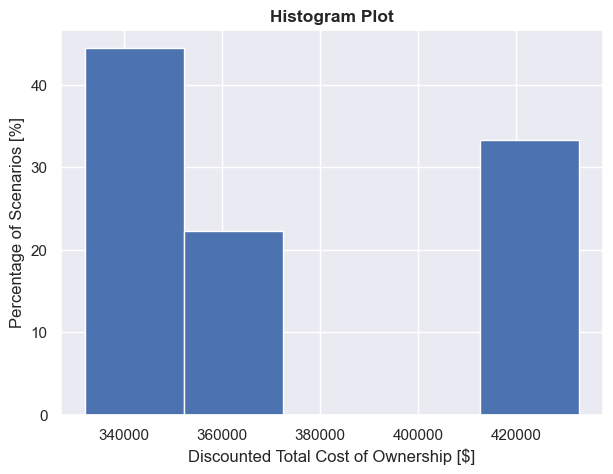
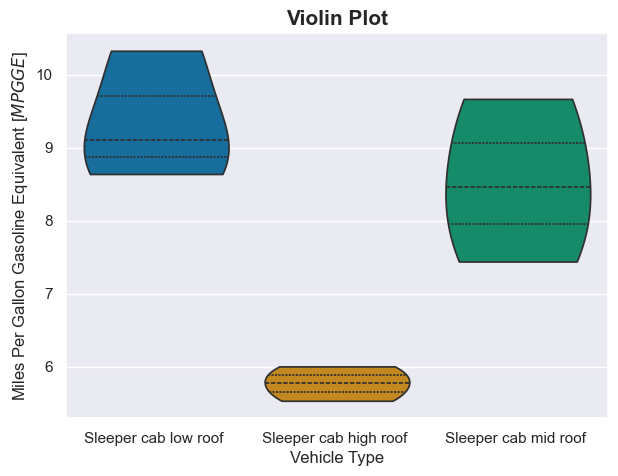
T3CO provides a demo file (t3co.demos.demo) for generating a TCOCalc for a specific year and a Ledger object for a given vehicle, scenario, and energy inputs. It showcases the modularity of the tool and allows the user to also download the results as a JSON or CSV file. The following visualization plots can be generated from T3CO results:
- TCO Breakdown Chart
- Histogram Plot
- Violin Plot
The user can provide other input parameters specific to each visualization method to further customize the plots.