README Contents
ALTRIOS







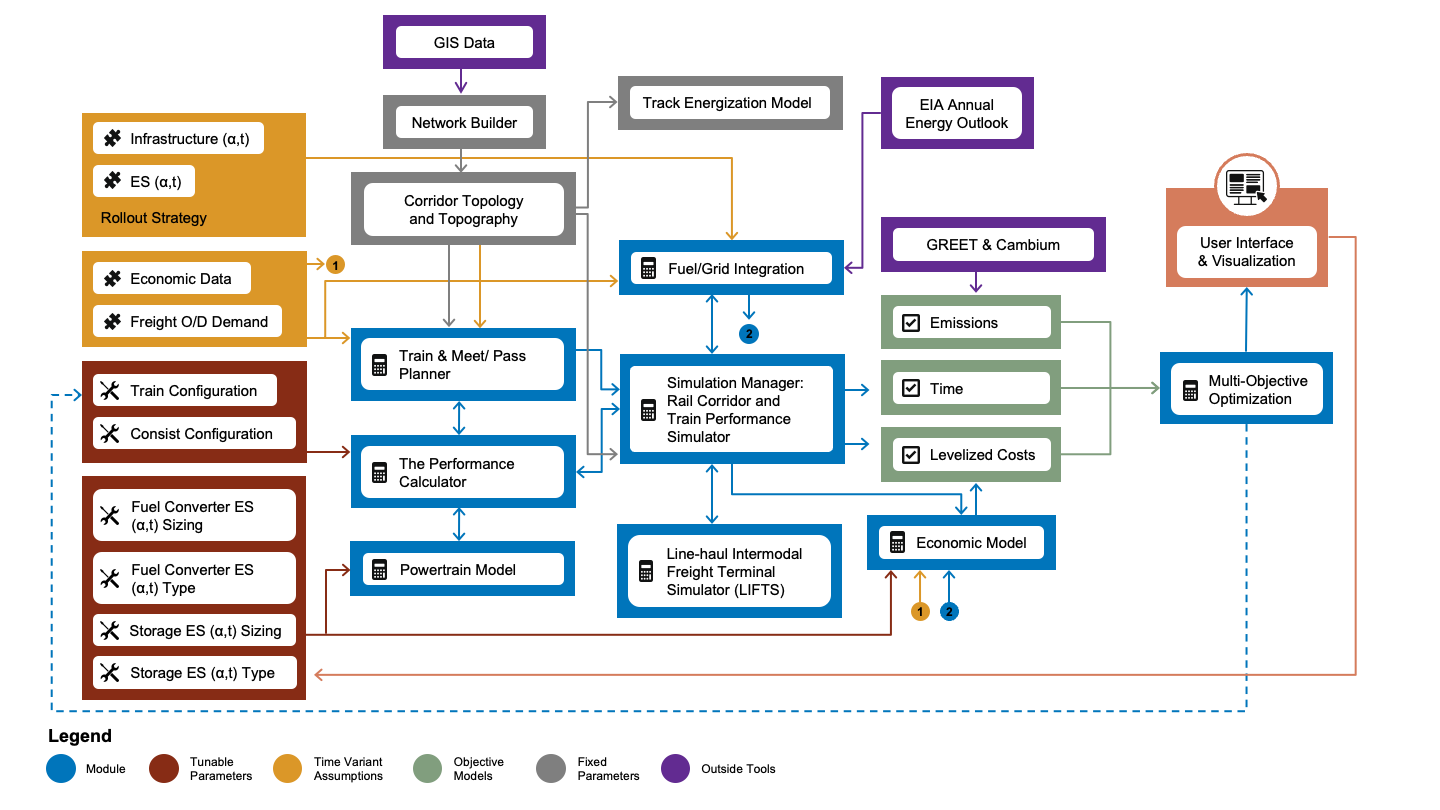
The Advanced Locomotive Technology and Rail Infrastructure Optimization System (ALTRIOS) is a unique, fully integrated, open-source software tool to evaluate strategies for deploying advanced locomotive technologies and associated infrastructure. ALTRIOS simulates freight-demand driven train scheduling, mainline meet-pass planning, locomotive dynamics, train dynamics, energy conversion efficiencies, and energy storage dynamics of line-haul train operations. Because new locomotives represent a significant long-term capital investment and new technologies must be thoroughly demonstrated before deployment, this tool provides guidance on the risk/reward tradeoffs of different technology rollout strategies. An open, integrated simulation tool is invaluable for identifying future research needs and making decisions on technology development, routes, and train selection. ALTRIOS was developed as part of a collaborative effort by a team comprising the National Laboratory of the Rockies (NLR), the University of Texas at Austin (UT Austin), Southwest Research Institute (SwRI), and BNSF Railway.
Much of the core code in ALTRIOS is written in the Rust Programming Language to ensure excellent computational performance and robustness, but we've built ALTRIOS with the intent of users interacting with the code through our feature-rich Python interface.
Installation
If you are an ALTRIOS developer, see Developer Documentation. Otherwise, read on.
Python Setup
- Python installation options:
- Option 1 -- Python: https://www.python.org/downloads/. We recommend Python 3.10. Be sure to check the
Add to PATHoption during installation. - Option 2 -- Anaconda: we recommend https://docs.conda.io/en/latest/miniconda.html.
- Option 1 -- Python: https://www.python.org/downloads/. We recommend Python 3.10. Be sure to check the
- Setup a python environment. ALTRIOS can work with Python 3.9, or 3.10, but we recommend 3.10 for better performance and user experience. Create a python environment for ALTRIOS with either of two methods:
- Option 1 -- Python Venv
-
Navigate to the ALTRIOS folder you just cloned or any folder you'd like for using ALTRIOS. Remember the folder you use!
-
Assuming you have Python 3.10 installed, run
(path to your python3.10 e.g. ~/AppData/Local/Programs/Python/Python310/python.exe) -m venv altrios-venvin Windowspython3.10 -m venv altrios-venvin Mac/Unix/Linux in your terminal enviroment (we recommend PowerShell in Windows, which comes pre-installed).
This tells Python 3.10 to use the
venvmodule to create a virtual environment (which will be ignored by git if namedaltrios-venv) in theALTRIOS/altrios-venv/. -
Activate the environment you just created to install packages or anytime you're running ALTRIOS:
- Mac and Linux:
source altrios-venv/bin/activate - Windows:
altrios-venv/Scripts/activate.batin a windows command prompt or power shell orsource altrios-venv/Scripts/activatein git bash terminal - When the environment is activated, your terminal session will have a decorator that looks like
(altrios-venv).
- Mac and Linux:
-
- Option 2 -- Anaconda:
- Open an Anaconda prompt (in Windows, we recommend Anaconda Powershell Prompt) and run the command
conda create -n altrios python=3.10to create an Anaconda environment namedaltrios. - Activate the environment to install packages or anytime you're running ALTRIOS: run
conda activate altrios.
- Open an Anaconda prompt (in Windows, we recommend Anaconda Powershell Prompt) and run the command
- Option 1 -- Python Venv
ALTRIOS Setup
With your Python environment activated, run pip install altrios.
Congratulations, you've completed installation! Whenever you need to use ALTRIOS, be sure to activate your python environment created above.
How to run ALTRIOS
With your activated Python environment with ALTRIOS fully installed, you can download the demo scripts to the current working directory inside of a demos/ folder with:
import altrios as alt
alt.copy_demo_files()
You can run the Simulation Manager through a multi-week simulation of train operations in by running python sim_manager_demo.py in demos/. This will create a plots/ subfolder in which the plots will be saved. To run interactively, fire up a Python IDE (e.g. VS Code, Spyder), and run the file. If you're in VS Code, you can run the file as a virtual jupyter notebook because of the "cells" that are marked with the # %% annotation. You can click on line 2, for example, and hit <Shift> + <Enter> to run the current cell in an interactive terminal (which will take several seconds to launch) and advance to the next cell. Alternatively, you can hit <Ctrl> + <Shift> + p to enable interactive commands and type "run current cell". There are several other python files in the demos/ folder to demonstrate various capabilities of ALTRIOS.
If you plan to modify the data used in the demo files, copy the data files to your local directory and load them from there, e.g.
res = alt.ReversibleEnergyStorage.from_file(
   alt.resources_root() / "powertrains/reversible_energy_storages/Kokam_NMC_75Ah_flx_drive.yaml"
)
would become
res = alt.ReversibleEnergyStorage.from_file(
   "./custom_battery.yaml"
)
Nearly every code object in ALTRIOS can be read from or written to common data formats. For more details, see the SerdeAPI trait documentation. All of the functions in the SerdeAPI are available through the python interface.
Acknowledgements
The ALTRIOS Team would like to thank ARPA-E for financially supporting the research through the LOCOMOTIVES program and Dr. Robert Ledoux for his vision and support. We would also like to thank the ARPA-E team for their support and guidance: Dr. Apoorv Agarwal, Mirjana Marden, Alexis Amos, and Catherine Good. We would also like to thank BNSF for their cost share financial support, guidance, and deep understanding of the rail industry’s needs. Additionally, we would like to thank Jinghu Hu for his contributions to the core ALTRIOS code. We would like to thank Chris Hennessy at SwRI for his support. Thank you to Michael Cleveland for his help with developing and kicking off this project.
About this book
This is the overall ALTRIOS documentation. We're working toward making this a fully integrated document that includes both the Python API and Rust core documentation.
Documentation
Python
Rust
Rust API Documentation
Rail Network
How Links Are Connected
The following schematic shows how links in a network are connected:

In ALTRIOS, each link (path between junctions along the rail with heading, grade, and location) in the rail network has both a direction and a location so each link has a unique link identification (ID) number for each direction. Each link can must be connected to at least one other link and up to four other links, two in each direction, comprising a previous link, an alternate previous link, a next link, and an alternate next link. Based on the above schematic, we can say that the links are interconnected thusly
| Link ID | Flipped ID | ID Prev | ID Prev Alt | ID Next | ID Next Alt |
|---|---|---|---|---|---|
| 1 | 8 | N/A | N/A | 4 | N/A |
| 2 | 9 | N/A | N/A | 3 | N/A |
| 3 | 10 | 2 | N/A | 4 | N/A |
| 4 | 11 | 1 | 3 | 7 | 5 |
| 5 | 12 | 4 | N/A | 6 | N/A |
| 6 | 13 | 5 | N/A | N/A | N/A |
| 7 | 14 | 4 | N/A | N/A | N/A |
| 8 | 1 | 11 | N/A | N/A | N/A |
| 9 | 2 | 10 | N/A | N/A | N/A |
| 10 | 3 | 11 | N/A | 9 | N/A |
| 11 | 4 | 14 | 12 | 8 | 10 |
| 12 | 5 | 13 | N/A | 11 | N/A |
| 13 | 6 | N/A | N/A | 12 | N/A |
| 14 | 7 | N/A | N/A | 11 | N/A |
Note that for a particular link, the links corresponding to the "Prev" and "Next" IDs are swapped in the reverse direction -- i.e. in the forward direction, link 4 has links 1 and 3 as "ID Prev" and "ID Prev Alt", respectively, and in the reverse direction, link 4 becomes 11 and has links 8 and 10 as "ID Next" and "ID Next Alt", respectively.
Link Lockout
The following schematic shows how link lockouts occur:
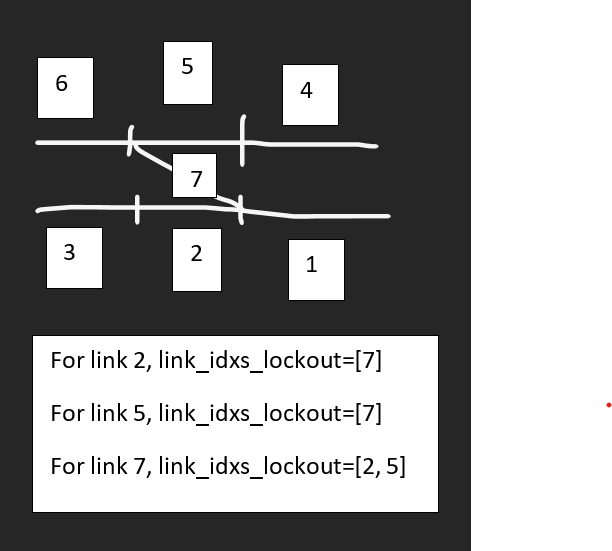
Table of Contents
- altrios
- altrios.rollout
- altrios.defaults
- altrios.plot
- altrios.train_planner.data_prep
- altrios.train_planner.planner
- altrios.train_planner.planner_config
- altrios.train_planner.schedulers
- altrios.train_planner.train_demand_generators
- altrios.optimization
- altrios.optimization.multi_obj_opt
- altrios.optimization.cal_and_val
- altrios.fuel_grid
- altrios.tests.test_locomotive
- altrios.tests
- altrios.tests.test_powertrain_generator
- altrios.tests.test_fuel_grid
- altrios.tests.test_metric_calculator
- altrios.tests.test_consist_sim
- altrios.tests.test_powertrain_edrive
- altrios.tests.test_serde
- altrios.tests.test_powertrain_res
- altrios.tests.test_utilities
- altrios.tests.test_locomotive_simulation
- altrios.tests.test_multi_obj_opt
- altrios.tests.test_powertrain_fuel_conv
- altrios.tests.test_train_planner
- altrios.tests.test_multi_obj_cal_and_val
- altrios.tests.mock_resources
- altrios.tests.test_objectives
- altrios.tests.test_consist
- altrios.resources
- altrios.resources.powertrains
- altrios.resources.powertrains.fuel_converters
- altrios.resources.powertrains.reversible_energy_storages
- altrios.resources.rolling_stock
- altrios.resources.networks
- altrios.resources.trains
- altrios.demos.speed_limit_train_sim_demo_with_derating
- altrios.demos
- altrios.demos.sim_manager_demo
- altrios.demos.set_speed_simple_corr_demo
- altrios.demos.rollout_demo
- altrios.demos.speed_limit_train_sim_demo
- altrios.demos.test_demos
- altrios.demos.plot_util
- altrios.demos.hel_demo
- altrios.demos.set_speed_train_sim_demo
- altrios.demos.bel_demo
- altrios.demos.conv_demo
- altrios.demos.speed_limit_simple_corr_demo
- altrios.metric_calculator
- ScenarioInfo
- main
- calculate_annual_metric
- calculate_rollout_lcotkm
- calculate_energy_per_freight
- calculate_energy_cost
- calculate_diesel_use
- calculate_electricity_use
- calculate_freight_moved
- calculate_ghg
- calculate_locomotive_counts
- calculate_refueler_counts
- calculate_rollout_investments
- calculate_rollout_total_costs
- altrios.user_interface
- altrios.loaders
- altrios.loaders.powertrain_components
- altrios.objectives
- altrios.stringline
- altrios.utilities
- altrios.stringline_old
- altrios.sim_manager
altrios
to_pydict
def to_pydict(self, data_fmt: str = "msg_pack", flatten: bool = False) -> Dict
Returns self converted to pure python dictionary with no nested Rust objects Arguments
- -
flatten: if True, returns dict without any hierarchy - -
data_fmt: data format for intermediate conversion step
get_hist_len
def get_hist_len(obj: Dict) -> Optional[int]
Finds nested history and gets lenth of first element
get_flattened
def get_flattened(obj: Dict | List,
                  hist_len: int,
                  prepend_str: str = "") -> Dict
Flattens and returns dictionary, separating keys and indices with a "."
Arguments
- obj: object to flatten
- hist_len: length of any lists storing history data
- prepend_str: prepend this to all keys in the returned flat dict
from_pydict
@classmethod
def from_pydict(cls,
                pydict: Dict,
                data_fmt: str = "msg_pack",
                skip_init: bool = False) -> Self
Instantiates Self from pure python dictionary Arguments
- -
pydict: dictionary to be converted to ALTRIOS object - -
data_fmt: data format for intermediate conversion step - -
skip_init: passed toSerdeAPImethods to control whether initialization is skipped
to_dataframe
def to_dataframe(
        self,
        pandas: bool = False,
        allow_partial: bool = False) -> Union[pd.DataFrame, pl.DataFrame]
Returns time series results from ALTRIOS object as a Polars or Pandas dataframe.
Arguments
- -
pandas: returns pandas dataframe if True; otherwise, returns polars dataframe by default - -
allow_partial: tries to return dataframe of length equal to solved time steps if simulation fails early
altrios.rollout
altrios.defaults
Module for default modeling assumption constants.
LHV_DIESEL_KJ_PER_KG
https://www.engineeringtoolbox.com/fuels-higher-calorific-values-d_169.html
RHO_DIESEL_KG_PER_M3
https://www.engineeringtoolbox.com/fuels-densities-specific-volumes-d_166.html
DIESEL_REFUEL_RATE_J_PER_HR
300 gallons per minute -> joules per hour
BEL_CHARGER_COST_USD
NLR Cost of Charging (Borlaug) showing ~linear trend on kW; ICCT report showing little change through 2030
DIESEL_LOCO_COST_USD
Zenith et al.
altrios.plot
altrios.train_planner.data_prep
load_freight_demand
def load_freight_demand(
    demand_table: Union[pl.DataFrame, pl.LazyFrame, Path,
                        str], config: planner_config.TrainPlannerConfig
) -> Tuple[pl.DataFrame, pl.Series, int]
Load the user input csv file into a dataframe for later processing
Arguments:
-
user_input_file- path to the input csv file that user import to the module Example Input: Origin Destination Train_Type Number_of_Cars Number_of_Containers Barstow Stockton Unit 2394 0 Barstow Stockton Manifest 2588 0 Barstow Stockton Intermodal 2221 2221Outputs:
-
df_annual_demand- dataframe with all pair information including: origin, destination, train type, number of cars -
node_list- List of origin or destination demand nodes
build_locopool
def build_locopool(config: planner_config.TrainPlannerConfig,
                   demand_file: Union[pl.DataFrame, pl.LazyFrame, Path, str],
                   dispatch_schedule: Union[pl.DataFrame, pl.LazyFrame]
                   | None = None,
                   locomotives_per_node: int | None = None) -> pl.DataFrame
Generate default locomotive pool
Arguments:
demand_file- Path to a file with origin-destination demand-
shares- List of shares for each locomotive type in loco_info (implemented for two-way shares only) Outputs: loco_pool- Locomotive pool containing all locomotives' information that are within the system
build_refuelers
def build_refuelers(node_list: pd.Series, loco_pool: pl.DataFrame,
                    refueler_info: pd.DataFrame,
                    refuelers_per_incoming_corridor: int) -> pl.DataFrame
Build the default set of refueling facilities.
Arguments:
node_list- List of origin or destination demand nodesloco_pool- Locomotive poolrefueler_info- DataFrame with information for each type of refueling infrastructure to use-
refuelers_per_incoming_corridor- Queue size per corridor arriving at each node. Outputs: refuelers- Polars dataframe of facility county by node and type of fuel
altrios.train_planner.planner
dispatch
def dispatch(dispatch_time: int, origin: str, loco_pool: pl.DataFrame,
             train_tonnage: float, hp_required: float, total_cars: float,
             config: planner_config.TrainPlannerConfig) -> pl.Series
Identify and select locomotives to dispatch for a train, based on origin, requirements, and availability.
This function selects the optimal set of locomotives from the available pool at a specified origin based on horsepower requirements, tonnage needs, and configuration parameters. It implements locomotive selection logic including potential diesel requirements and ensures sufficient power for the given train.
Parameters
dispatch_time : int Time (in hours) when the train is scheduled to depart origin : str Origin node name where the train will depart from loco_pool : pl.DataFrame DataFrame containing all locomotives in the network with their statuses and properties train_tonnage : float Total tonnage of the train to be dispatched hp_required : float Horsepower required for this train type on this origin-destination corridor total_cars : float Total number of cars (loaded, empty, or otherwise) included on the train config : planner_config.TrainPlannerConfig Configuration object with dispatch settings and rules
Returns
pl.Series Boolean series with same length as loco_pool, with True values indicating selected locomotives
Raises
ValueError If no locomotives are available at the origin or if requirements cannot be met
update_refuel_queue
def update_refuel_queue(
        loco_pool: pl.DataFrame, refuelers: pl.DataFrame, current_time: float,
        event_tracker: pl.DataFrame) -> Tuple[pl.DataFrame, pl.DataFrame]
Update locomotive refueling status, manage service queues, and track events.
This function processes arrived locomotives, updates refueling and servicing status, and manages the refueling queue across all locations. It tracks when locomotives finish refueling or servicing, updates their status appropriately, and records these events.
Parameters
loco_pool : pl.DataFrame DataFrame containing all locomotives in the network with their current status refuelers : pl.DataFrame DataFrame containing all refueling ports in the network with capacity information current_time : float Current simulation time in hours event_tracker : pl.DataFrame DataFrame tracking locomotive events (arrivals, refueling, etc.)
Returns
Tuple[pl.DataFrame, pl.DataFrame] loco_pool : Updated locomotive pool DataFrame with new statuses event_tracker : Updated event tracker with new refueling/servicing events
run_train_planner
def run_train_planner(
    rail_vehicles: List[alt.RailVehicle],
    location_map: Dict[str, List[alt.Location]],
    network: List[alt.Link],
    loco_pool: Optional[pl.DataFrame],
    refuelers: Optional[pl.DataFrame],
    scenario_year: int,
    train_type: alt.TrainType = alt.TrainType.Freight,
    config: planner_config.TrainPlannerConfig = planner_config.
    TrainPlannerConfig(),
    demand_file: Union[pl.DataFrame, Path, str] = defaults.DEMAND_FILE,
    network_charging_guidelines: Optional[pl.DataFrame] = None
) -> Tuple[
        pl.DataFrame,
        pl.DataFrame,
        pl.DataFrame,
        List[alt.SpeedLimitTrainSim],
        List[alt.EstTimeNet],
]
Run the train planner to generate consist plans, refueling schedules, and simulations.
This function is the main entry point for train planning. It processes demand data, schedules trains, assigns locomotives, plans refueling, and generates train simulations based on the provided configuration. It handles both single-train mode and multi-train scheduling across a network.
Parameters
rail_vehicles : List[alt.RailVehicle] List of available rail vehicle types with their properties location_map : Dict[str, List[alt.Location]] Dictionary mapping location IDs to lists of Location objects network : List[alt.Link] List of links defining the rail network loco_pool : Optional[pl.DataFrame] DataFrame containing available locomotives with their properties. If None, will be generated based on demand. refuelers : Optional[pl.DataFrame] DataFrame containing refueling facilities with their capacities. If None, will be generated based on configuration. scenario_year : int The year for which to run the simulation (affects energy prices, etc.) train_type : alt.TrainType Type of train to simulate (default: Freight) config : planner_config.TrainPlannerConfig Configuration object with planning parameters demand_file : Union[pl.DataFrame, Path, str] Source of demand data, either as DataFrame or file path network_charging_guidelines : Optional[pl.DataFrame] Guidelines for charging infrastructure by location
Returns
Tuple[pl.DataFrame, pl.DataFrame, pl.DataFrame, List[alt.SpeedLimitTrainSim], List[alt.EstTimeNet]] train_consist_plan : DataFrame with planned train consists and schedules loco_pool : Updated DataFrame of all locomotives and their states refuelers : DataFrame of all refueling facilities speed_limit_train_sims : List of SpeedLimitTrainSim objects for each planned train est_time_nets : List of EstTimeNet objects with estimated timings
altrios.train_planner.planner_config
TrainPlannerConfig Objects
@dataclass
class TrainPlannerConfig()
Dataclass class for train planner configuration parameters.
Attributes:
single_train_mode:Trueto only run one round-trip train and schedule its charging;Falseto plan train consistsmin_cars_per_train:Dictof the minimum length in number of cars to form a train for each train typetarget_cars_per_train:Dictof the standard train length in number of cars for each train typemanifest_empty_return_ratio: Desired railcar reuse ratio to calculate the empty manifest car demand, (E_ij+E_ji)/(L_ij+L_ji)cars_per_locomotive: Heuristic scaling factor used to size number of locomotives needed based on demand.cars_per_locomotive_fixed: IfTrue,cars_per_locomotiveoverrideshp_per_toncalculations used for dispatching decisions.refuelers_per_incoming_corridor: Heuristic scaling factor used to scale number of refuelers needed at each node based on number of incoming corridors.containers_per_car: Containers stacked on each car (applicable only for intermodal containers)require_diesel:Trueto require each consist to have at least one diesel locomotive.manifest_empty_return_ratio:Dictdrag_coeff_function:Dicthp_required_per_ton:Dictdispatch_scaling_dict:Dictloco_info:Dictrefueler_info:Dictreturn_demand_generators:Dict
return_demand_generators
default defined in train_demand_generators.py
altrios.train_planner.schedulers
calculate_waiting_time_single_dispatch
def calculate_waiting_time_single_dispatch(
        cumulative_demand_control: int, last_dispatch: int,
        demand_hourly: pl.DataFrame, dispatch_hour: int,
        remaining_demand_list: pl.DataFrame,
        remaining_demand_list_control: pl.DataFrame, search_range: int,
        od_pair_loop: str, min_num_cars_per_train: int,
        target_num_cars_per_train: int,
        config: planner_config.TrainPlannerConfig) -> tuple
Calculate the waiting time for a single dispatch using Polars DataFrames.
find_minimum_waiting_time
def find_minimum_waiting_time(
        num_iterations: int, demand_hourly: pl.DataFrame,
        border_time_list: list, min_num_cars_per_train: int,
        target_num_cars_per_train: int,
        config: planner_config.TrainPlannerConfig) -> pl.DataFrame
Find the minimum waiting time for dispatches using Polars DataFrame.
dispatch_hourly_demand_optimized_departure
def dispatch_hourly_demand_optimized_departure(
        demand_hourly: pl.DataFrame, rail_vehicles: List[alt.RailVehicle],
        freight_type_to_car_type: Dict[str, str],
        config: planner_config.TrainPlannerConfig) -> pl.DataFrame
Converts a table of demand into a dispatch plan where trains depart from each origin in uniformly spaced intervals.
Arguments:
demand-DataFrameorLazyFramerepresenting origin-destination demands (number of trains).rail_vehicles- List ofaltrios.RailVehicleobjects.-
Updated demandconfig-TrainPlannerConfigobject. Outputs:DataFrameorLazyFramerepresenting dispatches, each defined with an origin, destination, train type, number of (loaded and empty) cars, tonnage, and HP per ton requirement.
dispatch_uniform_demand_uniform_departure
def dispatch_uniform_demand_uniform_departure(
        demand: pl.DataFrame, rail_vehicles: List[alt.RailVehicle],
        freight_type_to_car_type: Dict[str, str],
        config: planner_config.TrainPlannerConfig) -> pl.DataFrame
Generate a tabulated demand pair to indicate the expected dispatching interval and actual dispatching timesteps after rounding, with departures from each terminal spaced as evenly as possible
Arguments:
demand-DataFrameorLazyFramerepresenting origin-destination demands (number of trains).rail_vehicles- List ofaltrios.RailVehicleobjects.-
config-TrainPlannerConfigobject. Outputs: schedule- Tabulated dispatching time for each demand pair for each train type in hours
altrios.train_planner.train_demand_generators
initialize_reverse_empties
def initialize_reverse_empties(
    demand: Union[pl.LazyFrame, pl.DataFrame]
) -> Union[pl.LazyFrame, pl.DataFrame]
Swap Origin and Destination and append _Empty to Train_Type.
Arguments:
-
demand-DataFrameorLazyFramerepresenting origin-destination demand.Outputs:
Updated demand
DataFrameorLazyFrame.
generate_return_demand_unit
def generate_return_demand_unit(
    demand_subset: Union[pl.LazyFrame, pl.DataFrame],
    config: planner_config.TrainPlannerConfig
) -> Union[pl.LazyFrame, pl.DataFrame]
Given a set of Unit train demand for one or more origin-destination pairs, generate demand in the reverse direction(s).
Arguments:
-
demand-DataFrameorLazyFramerepresenting origin-destination demand for Unit trains.Outputs:
Updated demand
DataFrameorLazyFramerepresenting demand in the reverse direction(s) for each origin-destination pair.
generate_return_demand_manifest
def generate_return_demand_manifest(
    demand_subset: Union[pl.LazyFrame, pl.DataFrame],
    config: planner_config.TrainPlannerConfig
) -> Union[pl.LazyFrame, pl.DataFrame]
Given a set of Manifest train demand for one or more origin-destination pairs, generate demand in the reverse direction(s).
Arguments:
-
demand-DataFrameorLazyFramerepresenting origin-destination demand for Unit trains.Outputs:
Updated demand
DataFrameorLazyFramerepresenting demand in the reverse direction(s) for each origin-destination pair.
generate_return_demand_intermodal
def generate_return_demand_intermodal(
    demand_subset: Union[pl.LazyFrame, pl.DataFrame],
    config: planner_config.TrainPlannerConfig
) -> Union[pl.LazyFrame, pl.DataFrame]
Given a set of Intermodal train demand for one or more origin-destination pairs, generate demand in the reverse direction(s).
Arguments:
-
demand-DataFrameorLazyFramerepresenting origin-destination demand for Unit trains.Outputs:
Updated demand
DataFrameorLazyFramerepresenting demand in the reverse direction(s) for each origin-destination pair.
generate_return_demand
def generate_return_demand(
        demand: pl.DataFrame,
        config: planner_config.TrainPlannerConfig) -> pl.DataFrame
Create a dataframe for additional demand needed for empty cars of the return trains
Arguments:
df_annual_demand- The user_input file loaded by previous functions that contains loaded demand for each demand pair.-
config- Object storing train planner configuration paramaters Outputs: df_return_demand- The demand generated by the need of returning the empty cars to their original nodes
generate_manifest_rebalancing_demand
def generate_manifest_rebalancing_demand(
        demand: pl.DataFrame, node_list: List[str],
        config: planner_config.TrainPlannerConfig) -> pl.DataFrame
Create a dataframe for summarized view of all origins' manifest demand in number of cars and received cars, both with loaded and empty counts
Arguments:
-
demand- The user_input file loaded by previous functions that contains laoded demand for each demand pair. -
node_list- A list containing all the names of nodes in the system -
config- Object storing train planner configuration paramatersOutputs:
-
origin_manifest_demand- The dataframe that summarized all the manifest demand originated from each node by number of loaded and empty cars with additional columns for checking the unbalance quantity and serve as check columns for the manifest empty car rebalancing function
generate_demand_trains
def generate_demand_trains(
        demand: pl.DataFrame, demand_returns: pl.DataFrame,
        demand_rebalancing: pl.DataFrame, rail_vehicles: List[alt.RailVehicle],
        freight_type_to_car_type: Dict[str, str],
        config: planner_config.TrainPlannerConfig) -> pl.DataFrame
Generate a tabulated demand pair to indicate the final demand for each demand pair for each train type in number of trains
Arguments:
-
demand- Tabulated demand for each demand pair for each train type in number of cars -
demand- The user_input file loaded and prepared by previous functions that contains loaded car demand for each demand pair. -
demand_returns- The demand generated by the need of returning the empty cars to their original nodes -
demand_rebalancing- Documented additional manifest demand pairs and corresponding quantity for rebalancing process -
config- Object storing train planner configuration paramaters Outputs: -
demand- Tabulated demand for each demand pair in terms of number of cars and number of trains
altrios.optimization
altrios.optimization.multi_obj_opt
Module for multi-objective optimization. This will likely use PyMOO extensively.
altrios.optimization.cal_and_val
Module for running train, locomotive, and/or consist models to calibrate and validate against test data.
get_delta_seconds
def get_delta_seconds(ds: pd.Series) -> pd.Series
Arugments:
- ds: pandas.Series; data of the current segment previously passed to to_datetime_from_format returns:
- out: pandas.Series; a pandas.Series data that shows the datetime deltas between rows of the
segment. Row i has time elasped between
iand rowi-1. Row 0 has value 0.
Returns pd.Series of time delta [s]
get_error
def get_error(t: np.array, mod: np.array, exp: np.array)
Return error for model data, mod, w.r.t. experimental data, exp, over time, t
ModelError Objects
@dataclass
class ModelError(object)
Dataclass class for calculating model error of various ALTRIOS objects w.r.t. test data.
Attributes:
-
ser_model_dict:dictvariable in which: -
key: a
strrepresenting trip keyword string -
value: a
strconverted from Rust locomotive models' serialization method -
model_type:strthat can only be'ConsistSimulation','SetSpeedTrainSim'or'LocomotiveSimulation'; indicates which model to instantiate during optimization process -
dfs: adictvariable in which: -
key:
strrepresenting trip keyword; will be the same keyword as inmodels -
value:
pandas.DataFramevariable with trip detailed data to be compared against. each df should have atime [s]column -
objectives: a list of 2-element tuples. For each tuple, element 0 is the name of the reference test data signal indfs; element 1 is a tuple of strings representing a hierarchical path to the corresponding model signal. This field is used for error calculation. -
params: a tuple whose individual element is astrcontaining hierarchical paths to parameters to manipulate starting from one of the 3 possible Rust model structs -
verbose:bool: ifTrue, the verbose of error calculation will be printed -
debug:bool: ifTrue, prints more stuff -
allow_partial: whether to allow partial runs, if True, errors out whenever a run can't be completed
get_errors
def get_errors(
    mod_dict,
    return_mods: Optional[bool] = False,
    pyplot: bool = False,
    plotly: bool = False,
    show_pyplot: bool = False,
    plot_save_dir: Optional[Path] = None,
    plot_perc_err: bool = False,
    font_size: float = 16,
    perc_err_target_for_plot: float = 1.5
) -> Tuple[
        Dict[str, Dict[str, float]],  # error dict
        # if return_mods is True, solved models
        Optional[Tuple[Dict[str, Dict[str, float]], Dict[
            str,
            Union[SetSpeedTrainSim, ConsistSimulation, LocomotiveSimulation],
        ]]]]
Calculate model errors w.r.t. test data for each element in dfs/models for each objective. Arugments:
- mod_dict: the dict whose values are generated Rust ALTRIOS models
- return_mods:
bool; if true, also returns dict of solved models - pyplot: if true, plots objectives with matplotlib.pyplot
- plotly: if true, plots with plotly.
plot_save_dirmust be provided. - show_pyplot: if true, shows pyplot plots
- plot_save_dir: Path for saving plots.
- plot_perc_err: Whether to include axes for plotting % error
Returns:
- errors:
dictwhose values are dicts containing the errors wrt each objective - solved_mods Optional;
dictwhose values are the Rust locomotive models; only returned whenreturn_modsis True
update_params
def update_params(
    xs: List[Any]
) -> Dict[str, Union[LocomotiveSimulation, SetSpeedTrainSim,
                     ConsistSimulation]]
Updates model parameters based on xs, which must match length of self.params
setup_plots
def setup_plots(
    key: str,
    mod: Any,
    time_seconds: List[float],
    bc: List[float],
    plots_per_key: int,
    pyplot: bool = False,
    plotly: bool = False,
    plot_save_dir: Optional[str] = None
) -> Tuple[Optional[Figure], Optional[plt.Axes], Optional[go.Figure]]
Arguments:
- plot: ...
- plotly: make and save plotly plots
CalibrationProblem Objects
class CalibrationProblem(ElementwiseProblem)
Problem for calibrating models to match test data
run_minimize
def run_minimize(problem: CalibrationProblem,
                 algorithm: GeneticAlgorithm,
                 termination: DMOT,
                 save_history: bool = False,
                 copy_algorithm: bool = False,
                 copy_termination: bool = False,
                 save_path: Optional[str] = "pymoo_res",
                 pickle_res_to_file: bool = False)
Arguments:
- save_path: filename for results -- will save
res_dfseparately by appending
min_error_selection
def min_error_selection(result_df: pd.DataFrame,
                        param_num: int,
                        norm_num: int = 2) -> np.ndarray
Arguments:
result_df- pd.DataFrame containing pymoo res.X and res.F concatenatedparam_num- number of parametersnorm_num- norm number -- e.g. 2 would result in RMS error
altrios.fuel_grid
altrios.tests.test_locomotive
altrios.tests
altrios.tests.test_powertrain_generator
altrios.tests.test_fuel_grid
altrios.tests.test_metric_calculator
altrios.tests.test_consist_sim
altrios.tests.test_powertrain_edrive
altrios.tests.test_serde
altrios.tests.test_powertrain_res
altrios.tests.test_utilities
altrios.tests.test_locomotive_simulation
altrios.tests.test_multi_obj_opt
altrios.tests.test_powertrain_fuel_conv
altrios.tests.test_train_planner
TestTrainPlanner Objects
class TestTrainPlanner(unittest.TestCase)
populate_me
def populate_me()
to be populated with an actual test and renamed accordingly
altrios.tests.test_multi_obj_cal_and_val
altrios.tests.mock_resources
altrios.tests.test_objectives
altrios.tests.test_consist
altrios.resources
altrios.resources.powertrains
altrios.resources.powertrains.fuel_converters
altrios.resources.powertrains.reversible_energy_storages
altrios.resources.rolling_stock
altrios.resources.networks
altrios.resources.trains
altrios.demos.speed_limit_train_sim_demo_with_derating
altrios.demos
Module containing demo files. Be sure to check out https://natlabrockies.github.io/altrios/how-to-run-altrios.
altrios.demos.sim_manager_demo
altrios.demos.set_speed_simple_corr_demo
SetSpeedTrainSim over a simple, hypothetical corridor
altrios.demos.rollout_demo
altrios.demos.speed_limit_train_sim_demo
altrios.demos.test_demos
altrios.demos.plot_util
plot_locos_from_ts
def plot_locos_from_ts(ts: alt.SetSpeedTrainSim,
                       x: str,
                       show_plots: bool = False)
Can take in either SetSpeedTrainSim or SpeedLimitTrainSim Extracts first instance of each loco_type and plots representative plots Offers two plotting options to put on x axis ts: train sim x: ["time","offset"]
altrios.demos.hel_demo
altrios.demos.set_speed_train_sim_demo
altrios.demos.bel_demo
altrios.demos.conv_demo
altrios.demos.speed_limit_simple_corr_demo
SetSpeedTrainSim over a simple, hypothetical corridor
altrios.metric_calculator
ScenarioInfo Objects
@dataclass
class ScenarioInfo()
Dataclass class maintaining records of scenario parameters that influence metric calculations.
Fields:
-
sims:SpeedLimitTrainSim(single-train sim) orSpeedLimitTrainSimVec(multi-train sim) including simulation results -
simulation_days: Number of days included in these results (after any warm-start or cool-down days were excluded) -
annualize: Whether to scale up output metrics to a full year's equivalent. -
scenario_year: Year that is being considered in this scenario. -
loco_pool:polars.DataFramedefining the pool of locomotives that were available to potentially be dispatched, each having aLocomotive_ID,Locomotive_Type,Cost_USD,Lifespan_Years. Not required for single-train sim. -
consist_plan:polars.DataFramedefining dispatched train consists, where each row includes aLocomotive_IDand aTrain_ID. Not required for single-train sim. -
refuel_facilities:polars.DataFramedefining refueling facilities, each with aRefueler_Type,Port_Count, andCost_USD, andLifespan_Years. Not required for single-train sim. -
refuel_sessions:polars.DataFramedefining refueling sessions, each with aLocomotive_ID,Locomotive_Type,Fuel_Type,Node, andRefuel_Energy_J. Not required for single-train sim. -
emissions_factors:polars.DataFramewith unitCO2eq_kg_per_MWhdefined for eachNode. Not required for single-train sim. -
nodal_energy_prices:polars.DataFramewith unitPricedefined for eachNodeandFuel. Not required for single-train sim. -
count_unused_locomotives: IfTrue, fleet composition is defined using all locomotives inloco_pool; ifFalse, fleet composition is defined using only the locomotives dispatched. Not required for single-train sim.
main
def main(scenario_infos: Union[ScenarioInfo, List[ScenarioInfo]],
         annual_metrics: Union[Tuple[str, str], List[Tuple[str, str]]] = [
             ('Freight_Moved', 'million tonne-mi'),
             ('Freight_Moved', 'million tonne-km'),
             ('Freight_Moved', 'car-miles'), ('Freight_Moved', 'cars'),
             ('Freight_Moved', 'detailed car counts'), ('GHG', 'tonne CO2-eq'),
             ('Count_Locomotives', 'assets'), ('Count_Refuelers', 'assets'),
             ('Energy_Costs', 'USD'),
             ('Energy_Per_Freight_Moved', 'kWh per car-mile')
         ],
         calculate_multiyear_metrics: bool = True) -> pl.DataFrame
Given a set of simulation results and the associated consist plans, computes economic and environmental metrics.
Arguments:
scenario_infos- List (with one entry per scenario year) of Scenario Info objectsmetricsToCalc- List of metrics to calculate, each specified as a tuple consisting of a metric and the desired unit-
calculate_multiyear_metrics- True if multi-year rollout costs (including levelized cost) are to be computed Outputs: values- DataFrame of output and intermediate metrics (metric name, units, value, and scenario year)
calculate_annual_metric
def calculate_annual_metric(metric_name: str, units: str,
                            info: ScenarioInfo) -> MetricType
Given a years' worth of simulation results and the associated consist plan, computes the requested metric.
Arguments:
thisRow- DataFrame containing the requested metric and requested units-
info- A scenario information object representing parameters and results for a single year Outputs: values- DataFrame of requested output metric + any intermediate metrics (metric name, units, value, and scenario year)
calculate_rollout_lcotkm
def calculate_rollout_lcotkm(values: MetricType) -> MetricType
Given a DataFrame of each year's costs and gross freight deliveries, computes the multi-year levelized cost per gross tonne-km of freight delivered.
Arguments:
-
DataFrame of LCOTKM result (metric name, units, value, and scenario year)values- DataFrame containing total costs and gross freight deliveries for each modeled scenario year Outputs:
calculate_energy_per_freight
def calculate_energy_per_freight(info: ScenarioInfo, units: str) -> MetricType
Given a years' worth of simulation results, computes a single year energy usage per unit of freight moved.
Arguments:
info- A scenario information object representing parameters and results for a single year-
DataFrame of energy usage per freight moved (metric name, units, value, and scenario year)units- Requested units Outputs:
calculate_energy_cost
def calculate_energy_cost(info: ScenarioInfo, units: str) -> MetricType
Given a years' worth of simulation results, computes a single year energy costs.
Arguments:
info- A scenario information object representing parameters and results for a single year-
DataFrame of energy costs + intermediate metrics (metric name, units, value, and scenario year)units- Requested units Outputs:
calculate_diesel_use
def calculate_diesel_use(info: ScenarioInfo, units: str)
Given a years' worth of simulation results, computes a single year diesel fuel use.
Arguments:
info- A scenario information object representing parameters and results for a single year-
DataFrame of diesel use (metric name, units, value, and scenario year)units- Requested units. Outputs:
calculate_electricity_use
def calculate_electricity_use(info: ScenarioInfo, units: str) -> MetricType
Given a years' worth of simulation results, computes a single year grid electricity use.
Arguments:
info- A scenario information object representing parameters and results for a single year-
DataFrame of grid electricity use (metric name, units, value, and scenario year)units- Requested units Outputs:
calculate_freight_moved
def calculate_freight_moved(info: ScenarioInfo, units: str) -> MetricType
Given a years' worth of simulation results, computes a single year quantity of freight moved
Arguments:
info- A scenario information object representing parameters and results for a single year-
DataFrame of quantity of freight (metric name, units, value, and scenario year)units- Requested units Outputs:
calculate_ghg
def calculate_ghg(info: ScenarioInfo, units: str) -> MetricType
Given a years' worth of simulation results, computes a single year GHG emissions from energy use
Arguments:
info- A scenario information object representing parameters and results for a single year-
DataFrame of GHG emissions from energy use (metric name, units, value, and scenario year)units- Requested units Outputs:
calculate_locomotive_counts
def calculate_locomotive_counts(info: ScenarioInfo, _) -> MetricType
Given a single scenario year's locomotive consist plan, computes the year's locomotive fleet composition
Arguments:
-
DataFrame of locomotive fleet composition metrics (metric name, units, value, and scenario year)info- A scenario information object representing parameters and results for a single year Outputs:
calculate_refueler_counts
def calculate_refueler_counts(info: ScenarioInfo, _) -> MetricType
Given a single scenario year's results, counts how many refuelers were included in the simulation.
Arguments:
-
DataFrame of locomotive fleet composition metrics (metric name, units, value, and scenario year)info- A scenario information object representing parameters and results for a single year Outputs:
calculate_rollout_investments
def calculate_rollout_investments(values: MetricType) -> MetricType
Given multiple scenario years' locomotive fleet compositions, computes additional across-year metrics
Arguments:
-
DataFrame of across-year locomotive fleet composition metrics (metric name, units, value, and scenario year)values- DataFrame with multiple scenario years' locomotive fleet composition metrics Outputs:
calculate_rollout_total_costs
def calculate_rollout_total_costs(values: MetricType) -> MetricType
Given multiple scenario years' locomotive fleet compositions, computes total per-year costs
Arguments:
-
DataFrame of across-year locomotive fleet composition metrics (metric name, units, value, and scenario year)values- DataFrame with annual cost metrics Outputs:
altrios.user_interface
altrios.loaders
altrios.loaders.powertrain_components
altrios.objectives
altrios.stringline
Created on Wed Dec 15 09:59:15 2021
@author: groscoe2
warmupLength
hours
cooldownLength
hours
numDays
full simulation length
plotName
name of plot file
networkOverride
'C:/Users/MMP-S/Downloads/network.json' if ussing a different network file than one in results directory
checkSubfolders
walk through subfolders looking for results
overwriteExisting
overwrite existing plots
colors
line graph colors, if unspecified, will use default plotly colors
narrowWidth
narrow width of lines
wideWidth
wide width of lines
altrios.utilities
Module for general functions, classes, and unit conversion factors.
KWH_PER_MJ
https://www.eia.gov/energyexplained/units-and-calculators/energy-conversion-calculators.php
package_root
def package_root() -> Path
Returns the package root directory.
resources_root
def resources_root() -> Path
Returns the resources root directory.
cumutrapz
def cumutrapz(x, y)
Returns cumulative trapezoidal integral array for:
Arguments:
x- array of monotonically increasing values to integrate overy- array of values being integrated
resample
def resample(df: pd.DataFrame,
             dt_new: Optional[float] = 1.0,
             time_col: Optional[str] = "Time[s]",
             rate_vars: Tuple[str] = [],
             hold_vars: Tuple[str] = []) -> pd.DataFrame
Resamples dataframe df.
Arguments:
- df: dataframe to resample
- dt_new: new time step size, default 1.0 s
- time_col: column for time in s
- rate_vars: list of variables that represent rates that need to be time averaged
- hold_vars: vars that need zero-order hold from previous nearest time step (e.g. quantized variables like current gear)
smoothen
def smoothen(signal: npt.ArrayLike, period: int = 9) -> npt.ArrayLike
Apply smoothing to signal, assuming 1 Hz data collection.
copy_demo_files
def copy_demo_files(demo_path: Path = Path("demos"))
Copies demo files from package directory into local directory.
Arguments
- demo_path: path (relative or absolute in )
Warning
Running this function will overwrite existing files so make sure any files with changes you'd like to keep are renamed.
show_plots
def show_plots() -> bool
Returns true if plots should be displayed based on SHOW_PLOTS environment variable.
SHOW_PLOTS defaults to true, and to set it false, run SHOW_PLOTS=false python your_script.py
altrios.stringline_old
Created on Wed Dec 15 09:59:15 2021
@author: groscoe2
altrios.sim_manager
Module for getting the output of the Train Consist Planner and Meet Pass Planner to run 3 week simulation.
main
def main(
    rail_vehicles: List[alt.RailVehicle],
    location_map: Dict[str, List[alt.Location]],
    network: List[alt.Link],
    simulation_days: int = defaults.SIMULATION_DAYS,
    warm_start_days: int = defaults.WARM_START_DAYS,
    scenario_year: int = defaults.BASE_ANALYSIS_YEAR,
    debug: bool = False,
    loco_pool: Optional[pl.DataFrame] = None,
    refuelers: Optional[pl.DataFrame] = None,
    grid_emissions_factors: Optional[pl.DataFrame] = None,
    nodal_energy_prices: Optional[pl.DataFrame] = None,
    train_planner_config: planner_config.TrainPlannerConfig = planner_config.
    TrainPlannerConfig(),
    train_type: alt.TrainType = alt.TrainType.Freight,
    demand_file: Union[pl.DataFrame, Path, str] = str(defaults.DEMAND_FILE),
    network_charging_guidelines: Optional[pl.DataFrame] = None
) -> Tuple[
        pl.DataFrame,
        pl.DataFrame,
        pl.DataFrame,
        pl.DataFrame,
        alt.SpeedLimitTrainSimVec,
        List[List[alt.LinkIdxTime]],
]
Return
return (
    train_consist_plan,
    loco_pool,
    refuelers,
    grid_emissions_factors,
    nodal_energy_prices,
    train_sims,
    timed_paths,
)
Developers
- Cloning the GitHub Repo
- Installing the Python Package
- Rust Installation
- Automated Building and Testing
- Manually Building the Python API
- Testing
- Releasing
Cloning the GitHub Repo
Clone the repository:
- Download and install git -- accept all defaults when installing.
- Create a parent directory in your preferred location to contain the repo -- e.g.
<USER_HOME>/Documents/altrios_project/. - Open git bash, and inside the directory you created,
clone
the ALTRIOS repository with e.g.
git clone https://github.com/NatLabRockies/ALTRIOS.git.
Installing the Python Package
Within the ALTRIOS folder, run pip install -e ".[dev]"
Rust Installation
Install Rust: https://www.rust-lang.org/tools/install.
Automated Building and Testing
There is a shortcut for building and running all tests, assuming you've installed the python package
with develop mode. In the root of the ALTRIOS/ folder, run the build_and_test.sh script. In
Windows bash (e.g. git bash), run sh build_and_test.sh, or in Linux/Unix, run
./build_and_test.sh. This builds all the Rust code, runs Rust tests, builds the Python-exposed
Rust code, and runs the Python tests.
Manually Building the Python API
Run maturin develop --release. Note that not including --release will cause a significant
runtime computational performance penalty.
Testing
Manually
Whenever updating code, always run cargo test --release inside ALTRIOS/ to ensure that all
tests pass. Also, be sure to rebuild the Python API regularly to ensure that it is up to date.
Python unit tests run with python -m unittest discover in the root folder of the git repository.
With GitHub Actions
Any time anyone pushes to main or does any pull request, the GitHub Actions test
workflows are triggered.
Releasing
To PyPI With GitHub Actions
To release the package with GitHub Actions, you can follow these steps:
- Create a new branch in the format
v<major>.<minor>.<patch>, for examplev0.2.1. - Update the version number in the
pyproject.tomlfile. Commit and push to https://github.com/NatLabRockies/altrios. - Open a pull request into the main branch and make sure all checks pass.
- Once the pull request is merged into the main branch by a reviewer, create a new GitHub release and create a tag that matches the branch name. Once the release is created, a GitHub action will be launched to build the wheels and publish them to PyPI.
To crates.io
altrios-core
If you've updated altrios-proc-macros, be sure to publish that crate first and then update the
Cargo.toml dependency for this crate.
To release this crate, you need to be setup as developer for this crate in crates.io. Follow these steps:
-
Increment the version number in altrios-core/Cargo.toml:
version = "0.2.1". -
If changes were made in
altrios-proc-macros, follow the release process for that crate first, and then update thealtrios-proc-macrosdependency version to match the newaltrios-proc-macrosversion inaltrios-core/Cargo.toml. -
Run
git tag ac<major>.<minor>.<patch>, whereac<major>.<minor>.<patch>should look likeac0.1.4, reflecting whatever the current version is. -
Push the tag with
git push public ac<major>.<minor>.<patch>, wherepublicis this remote:git@github.com:NatLabRockies/altrios.git. -
Run
cargo publish --dry-runto make sure everything checks. -
Run
cargo publishto release the update.
In the future, we may incorporate this into GitHub Actions.
altrios-proc-macros
To release this crate, you need to be setup as developer for this crate in crates.io. Follow these steps:
-
Increment the version number in Cargo.toml:
altrios-proc-macros = { path = "./altrios-core/altrios-proc-macros", version = "0.2.0" }. -
Run
git tag apm<major>.<minor>.<patch>, whereapm<major>.<minor>.<patch>should look likeapm0.1.4, reflecting whatever the current version is. -
Push the tag with
git push public apm<major>.<minor>.<patch>, wherepublicis this remote:git@github.com:NatLabRockies/altrios.git. -
Run
cargo publish --dry-runto make sure everything checks. -
Run
cargo publishto release the update.
In the future, we may incorporate this into GitHub Actions.
Press Releases
-
All Aboard! NREL Releases First Comprehensive, Open-Source Software for Freight Rail Decarbonization | National Laboratory of the Rockies
-
SwRI helps create open-source software to assist rail industry decarbonization efforts | Southwest Research Institute
National and International Coverage
-
A Clean Locomotive Revolution, Renewable Deployment Setback Ordinances, and Using Water to Cool Supercomputers | Transforming Energy: The NREL Podcast
-
World’s first open-source software for exploring rail decarbonization is launched | Electric and Hybrid Rail Technology
-
US team delivers open-source rail freight decarbonisation tool | World News
-
Open-Source Platform Simulates Energy Transition Strategies for Rail Infrastructure | Eepower
-
ALTRIOS: Software to Aid Decarbonization of Rail Industry Released by NREL | Energy Portal
-
Open-source software aims to get freight decarbonisation on track | Institution of Mechanical Engineers
-
NREL Releases Open-Source ALTRIOS Decarbonization Modeling Software | Railpage Australia
-
Open-source software available for rail decarbonization | Diesel & Gas Turbine Worldwide
-
SwRI helps create open-source software to assist rail industry decarbonization efforts | Technology Today
-
SwRI helps create open-source software to assist rail industry decarbonization efforts | Bioengineer.org
-
New Altrios Software from SwRI Supports Rail Industry’s Shift Towards Sustainability | Open Source For You
-
SwRI helps create open-source software to assist rail industry decarbonization efforts | Eurek!Alert
Magazines
-
NREL Releases Open-Source ALTRIOS Decarbonization Modeling Software | Railway Age
-
US team delivers open-source rail freight decarbonisation tool | The Engineer
How to Update This Markdown Book
Setup
If not already done, install mdbook
Serving locally
Run th following in the repository root directory:
- If any python files were modified,
- Install pipx
- Install pydoc-markdown
- Install mdbook-toc
- run
pydoc-markdown -I python/ -p altrios --render-toc > docs/src/python_docs.md. Do not modify this file manually.
- Run
mdbook serve --open docs/
Publishing
- Update
book.tomlor files indocs/src/ - Make sure the docs look good locally by running the steps in Serving Locally
- Commit files and push to
mainbranch
After that, a GitHub action will build the book and publish it.