Multi-objective
This page loads results that have two or more objectives, trains a model for each, and asks for the next experiments that push the Pareto front outward. The web app loads and trains; the multi-objective suggestion and the Pareto front are in Python for now.
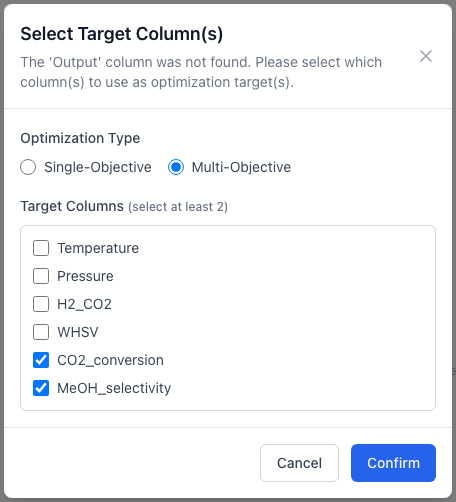
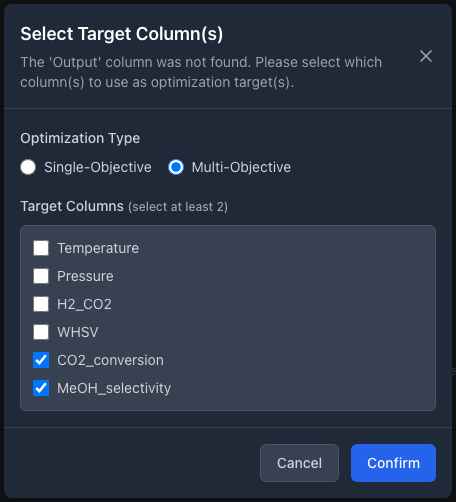
Loading a file with two objective columns. The file has no Output column, so ALchemist asks which columns are the targets.
What works where
| Step | Web app | Python | REST |
|---|---|---|---|
| Load several target columns | Load CSV, then Select Target Column(s) | load_data(path, target_columns=[...]) |
experiments/upload?target_columns=a,b |
| Train | BoTorch only; no metrics shown | train_model(backend="botorch") |
model/train with "backend": "botorch" |
Suggest with qEHVI or qNEHVI |
not offered | suggest_next with a goal per objective and a ref_point |
acquisition/suggest; one goal for every objective, no ref_point |
| See the Pareto front | no Pareto view | find_optimum, plot_pareto_frontier |
none |
Theory, including the reference point, is in Acquisition functions.
1. Load data with several targets
The file holds one column for each variable and one for each objective. ALchemist reads a column named Output as the single objective and asks nothing, so name the objective columns something else.
- Define the variables (Define variables).
- In the Experiment Data panel, choose Load CSV and pick the file.
- In Select Target Column(s), choose Multi-Objective instead of Single-Objective. A list of every column in the file appears under Target Columns.
- Tick the columns that hold objectives, at least two. Do not tick the variable columns, which the list also offers. Confirm stays disabled until two are ticked.
In the web app and over REST a single goal, maximize or minimize, applies to every objective. Python takes one direction per objective.
import numpy as np
import pandas as pd
from alchemist_core import OptimizationSession

rng = np.random.default_rng(11)
session = OptimizationSession()
session.add_variable("temperature", "real", bounds=(200.0, 300.0), unit="°C")
session.add_variable("pressure", "real", bounds=(20.0, 80.0), unit="bar")
session.add_variable("whsv", "real", bounds=(1.5, 18.0))

rows = []
for p in session.generate_initial_design("lhs", n_points=12, random_seed=11):
    t = (p["temperature"] - 200) / 100
    q = (p["pressure"] - 20) / 60
    w = (p["whsv"] - 1.5) / 16.5
    rows.append({
        **p,
        "conversion": 100 * (0.2 + 0.7 * t * (1 - 0.4 * w) + 0.1 * q) + rng.normal(0, 1),
        "selectivity": 100 * (0.9 - 0.5 * t**2 + 0.1 * q - 0.1 * w) + rng.normal(0, 1),
    })
pd.DataFrame(rows).to_csv("two_objectives.csv", index=False)

session.load_data("two_objectives.csv", target_columns=["conversion", "selectivity"])
print(session.is_multi_objective, session.objective_names)
Send the file as multipart form data in a file field. The names are comma-separated.
POST /api/v1/sessions/{session_id}/experiments/preview takes the same file and lists its columns, which is how the app builds the dialog.
Adding single rows
Add Point... records one output per row, so on a multi-objective session it is refused rather than leaving the other objectives empty. From Python, add_experiment takes a dict with every objective, session.add_experiment({"x": 0.3}, {"conversion": 42.0, "selectivity": 88.0}), or a list in target order; a bare float is refused with the missing objectives named. Or bring new results in as a CSV that has every objective.
2. Train a model for each objective
- In the Model tab, choose BoTorch. The scikit-learn backend supports one objective and refuses the data with an error.
- Choose Train Model. A message reports "Model trained successfully (2 objectives)", and Trained Model Info reads "Trained 2 objectives. Cross-validation metrics aren't computed for multi-objective models yet."
ALchemist fits one Gaussian process per objective. The hyperparameters in View Hyperparameters list them by objective name.
Known issue
W25: a multi-objective model shows no cross-validation summary in the web app, and the training response's metrics is empty. Over REST the parity, Q-Q and calibration routes take a target query parameter naming the objective (the first objective by default): GET .../visualizations/parity?target=selectivity. In Python, session.plot_parity(target_columns="conversion") draws one objective, and "all" draws every one.
3. Suggest the next experiments
The only strategies for several objectives are qEHVI and qNEHVI, which score a candidate by the hypervolume it is expected to add above a reference point. qNEHVI also allows for noise in the observed values. Any other strategy is refused with "multi-objective optimization requires 'qEHVI' or 'qNEHVI'".
The web app's Acquisition tab lists neither strategy, so Run Acquisition Strategy cannot suggest for a multi-objective session there, and Find Model Optimum returns an error. Use Python, or REST for a suggestion.
Find Model Optimum and POST /api/v1/sessions/{session_id}/acquisition/find-optimum return one point, so on a multi-objective session they answer 400. Use find_optimum in Python, below, for the Pareto frontier.
| Argument | Meaning |
|---|---|
strategy |
"qEHVI" or "qNEHVI". |
goal |
"maximize" or "minimize" for every objective, or a list with one direction per objective. |
ref_point |
One number per objective, in the objectives' own units, worse than any result you would accept. Left out, ALchemist uses a point just beyond the worst observed value of each objective, recomputed on every call. |
n_suggestions |
The batch size. |
suggestions = session.suggest_next(
    strategy="qNEHVI",
    goal=["maximize", "maximize"],
    n_suggestions=2,
    ref_point=[0.0, 0.0],
)
print(suggestions)
Run the suggested points, add the results to the CSV and load it again. To see where the experiments stand, find_optimum returns the Pareto-optimal recorded experiments, and plot_pareto_frontier draws them for two objectives:
How ALchemist does it
suggest_next in alchemist_core/session.py turns every objective into a maximization, passes the reference point to BoTorch's expected-hypervolume-improvement acquisition, and checks that goal and ref_point have one entry per objective. The Pareto frontier comes from non-dominated sorting of the recorded results, so it contains experiments you have run, not model predictions; predicted_values in the result holds the model's prediction at each. plot_pareto_frontier handles exactly two objectives. How the hypervolume and the default reference point are defined is in Acquisition functions.