Optimal design and AI effect suggestion
This page generates a design that is optimal for a model you name, and shows how to ask an AI model which effects that model should contain.
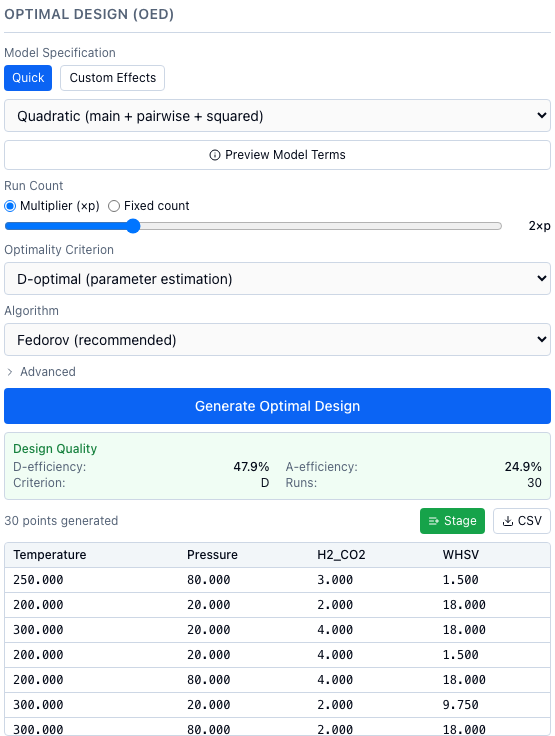
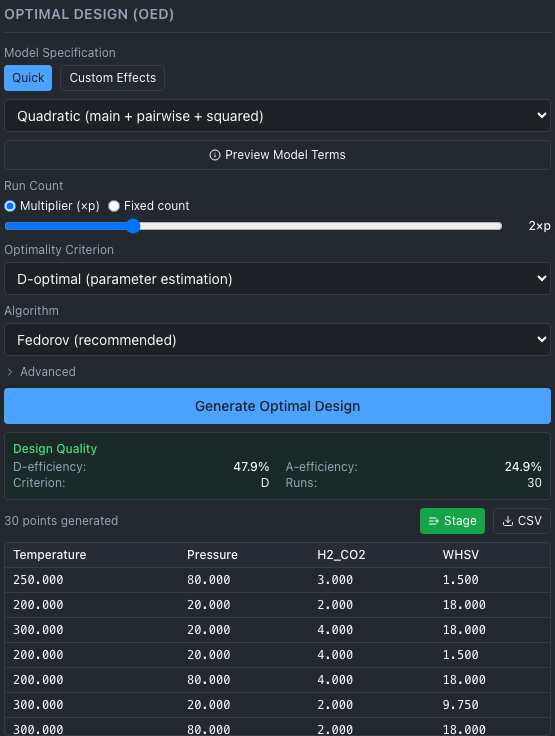
A 30-run optimal design for a quadratic model on four simulated reactor variables. It was not seeded, so a new click gives different efficiencies.
When to use it
An optimal design assumes a model, such as temperature, pressure, their interaction and temperature squared, and picks the runs that estimate those terms best. Use it when experiments are expensive, when you can name the terms you expect to matter, or when constraints rule out the corners of a classical design. Otherwise start with a space-filling initial design. The criteria and algorithms are in Design of experiments.
1. Generate an optimal design
The Optimal Design (OED) panel is in the left column, below Initial Design (DoE).
- Under Model Specification, choose Quick or Custom Effects.
- In Quick, pick a model from the menu below. In Custom Effects, tick the terms you want (Main Effects, Interactions, Quadratic), or type more in "Additional effects (comma-separated)", such as
Temperature*PressureorTemperature**2. - Choose Preview Model Terms for the number of model columns p, the minimum runs (p), the recommended runs (2p) and the terms. It also sets the Fixed count to the recommended number.
- Under Run Count, use Multiplier (×p) (a slider from 1 to 5) or Fixed count.
- Pick the Optimality Criterion and the Algorithm. Under Advanced are the grid levels, the maximum iterations and the random seed.
- Choose Generate Optimal Design. The Design Quality box shows the efficiencies, the criterion and the number of runs, and the points appear in a table.
- Choose Stage to queue the points for Add Point..., or CSV to save
optimal_design_<criterion>_<N>pts.csv(see the initial design).
Nothing is added to the session's data until you record results; generating a design does add an audit log entry.
| Quick menu | Terms in the model |
|---|---|
| Linear (main effects only) | Intercept and one term per variable. |
| Interaction (main + pairwise) | Linear, plus every pair of variables. |
| Quadratic (main + pairwise + squared) | Interaction, plus a squared term for each real and integer variable. This is the default. |
A categorical variable adds one column per category after the first, so p counts columns, not variables.
| Optimality Criterion | criterion |
|---|---|
| D-optimal (parameter estimation) | D, the default |
| A-optimal (min avg variance) | A |
| I-optimal (min prediction variance) | I |
| Algorithm | algorithm |
|---|---|
| Fedorov (recommended) | fedorov, the default |
| Modified Fedorov | modified_fedorov |
| DetMax (best quality) | detmax |
| Simple Exchange | simple_exchange |
| Sequential (fastest) | sequential |
Known issue
T10: DetMax (best quality) and Modified Fedorov run the same exchange as Fedorov (recommended), so "best quality" is not a better design; the server log says so when either is chosen. Details: Optimal designs.
from alchemist_core import OptimizationSession

session = OptimizationSession()
session.add_variable("temperature", "real", bounds=(200.0, 300.0), unit="°C")
session.add_variable("pressure", "real", bounds=(20.0, 80.0), unit="bar")
session.add_variable("h2_co2", "real", bounds=(2.0, 4.0))

info = session.get_optimal_design_info(model_type="quadratic")
print(info["p_columns"], info["n_points_minimum"], info["n_points_recommended"])

points, design = session.generate_optimal_design(
    model_type="quadratic", p_multiplier=2.0, criterion="D", algorithm="fedorov", random_seed=7
)
print(len(points), round(design["D_eff"], 1), round(design["A_eff"], 1))
print(points[0])
To name the effects yourself, pass effects instead of model_type, and n_points instead of p_multiplier:
points, design = session.generate_optimal_design(
    effects=["temperature", "pressure", "h2_co2", "temperature*pressure", "temperature**2"],
    n_points=12,
    criterion="I",
    algorithm="sequential",
    random_seed=7,
)
print(design["model_terms"])
Run each point, then record the result with session.add_experiment(point, output=...).
POST /api/v1/sessions/{session_id}/optimal-design/info
Content-Type: application/json

{"model_type": "quadratic"}
The response holds model_terms, p_columns, n_points_minimum and n_points_recommended.
POST /api/v1/sessions/{session_id}/optimal-design
Content-Type: application/json

{"model_type": "quadratic", "p_multiplier": 2.0, "criterion": "D", "algorithm": "fedorov", "random_seed": 7}
The response holds points, n_points, design_info and feasibility, which is null unless the session has input constraints. To queue the points as Stage does, see the initial design page.
Defaults and limits
Python and REST have no default model or run count: send model_type or effects, and n_points or p_multiplier (1.0 to 10.0; the slider stops at 5). The other settings match the web app: criterion D, algorithm fedorov, n_levels=5 (2 to 20), max_iter=200 (10 to 10,000), and random_seed=None, which gives a new design on every call.
| Situation | What happens |
|---|---|
| Fewer runs than model columns | The call fails: "n_points=5 is fewer than the number of model columns p=10". Use at least p runs. |
| More runs than candidate points | The call fails. Raise the grid levels. |
| A variable appears in no effect | Its values are spread evenly over its range, in shuffled order: it varies but is not optimized. |
| A categorical variable | Allowed, but marked experimental in the code. For screening, Full Factorial or GSD are better established. |
| A squared term on a two-value discrete variable | Refused: the square equals the intercept. |
| Input constraints | Candidates are cut to the feasible region; see Constraints. |
How ALchemist does it
run_optimal_design in alchemist_core/utils/optimal_design.py picks runs from a candidate grid of n_levels points per continuous variable, swapping points while the criterion improves, up to max_iter passes. Both efficiencies are reported whichever criterion you chose.
2. Ask an AI model which effects to include
In Custom Effects mode the panel has a collapsed section, Suggest effects with AI, marked Beta. It sends your variable names and types, the effects it may choose from, and a description you write to a language model, which picks effects and says why. No experimental results are sent. Treat the answer as a starting point.
Install the extra first; it adds openai, httpx and edison-client.
- Choose Custom Effects, then open Suggest effects with AI.
- Pick a Provider: OpenAI or Ollama (local).
- For OpenAI, set the Model (it starts at
gpt-4o) and type an API Key, or leave it blank to use a saved key or the server'sOPENAI_API_KEY. For Ollama (local), check the Base URL (it starts athttp://localhost:11434/v1), choose Refresh, and pick a Model. - Optionally tick Edison Scientific, a literature search that grounds the suggestion in cited papers. It takes about 10 to 20 minutes and by default gives up after 20, and the suggestion then continues without literature. Give an Edison API Key (or set
EDISON_API_KEYon the server) and a Search mode: Literature (standard), Literature (high accuracy) or Precedent. - Describe the system in Experiment description, for example "Methanol synthesis over a Cu/ZnO catalyst; maximize yield at 200 to 300 °C".
- Choose Suggest effects. Cancel stops the wait.
- The suggested effects appear as chips; one marked with a warning sign is not in your variable set. Choose Apply to checkboxes to replace the ticked terms with the suggestion. Reasoning, Literature context (Edison) and Sources open below.
Without Edison, any sources come from the model's memory, and the panel marks them as not retrieved from a literature database: check them before citing. The server keeps an Edison result in memory, so asking again with the same description is instant; "Re-run Edison" asks for a fresh search.
Save provider settings writes the Ollama URL and any key you typed to ~/.alchemist/config.json on the server's machine, readable by its owner only.
Save provider settings merges into what is saved: the other provider's settings stay, and a key saved earlier stays unless you type a new one. The provider is sent each variable's name, type, range or categories and unit, so put only what the names do not say in Experiment description.
There is no OptimizationSession method for this step. Call the streaming REST route on a running ALchemist server, then pass the effects to generate_optimal_design. The block calls a provider, so the docs tests do not run it.
import json
import httpx

body = {
    "structuring_provider": {"provider": "openai", "model": "gpt-4o"},
    "system_context": "Methanol synthesis over a Cu/ZnO catalyst; maximize yield.",
}
url = f"http://localhost:8000/api/v1/llm/suggest-effects/{session_id}"
with httpx.stream("POST", url, json=body, timeout=None) as response:
    for line in response.iter_lines():
        if line.startswith("data: "):
            event = json.loads(line[len("data: "):])
            if event["status"] == "complete":
                effects = event["result"]["effects"]
points, design = session.generate_optimal_design(effects=effects, p_multiplier=2.0)
POST /api/v1/llm/suggest-effects/{session_id}
Content-Type: application/json

{
  "structuring_provider": {"provider": "openai", "model": "gpt-4o"},
  "system_context": "Methanol synthesis over a Cu/ZnO catalyst; maximize yield.",
  "edison_config": {"job_type": "literature"}
}
Leave out edison_config to skip the literature search; it also takes api_key, timeout_secs (60 to 3600, default 1200) and force_refresh. A provider's api_key is optional when a key is saved; base_url applies to ollama. The answer is a stream of server-sent events, each data: followed by JSON with a status (progress statuses while it works); the last is complete, with a result holding effects, reasoning, confidence, sources and disclaimer, or error, with a message.
GET /api/v1/llm/config returns the saved settings with keys masked.
How ALchemist does it
api/services/llm_service.py tells the model to choose only from the listed effects, pick the smallest set it can justify, and cite only what the literature context contains. Effects outside your variable set are dropped when you apply the suggestion.