7. Suggest next
With a trained model, ALchemist proposes the next experiments: it scores candidate points with an acquisition function and returns the best. This page runs a strategy, queues the suggestions, and finds the point the model predicts is best.
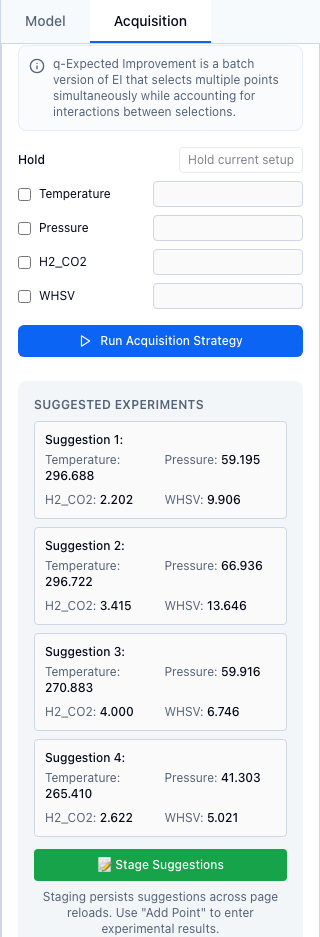
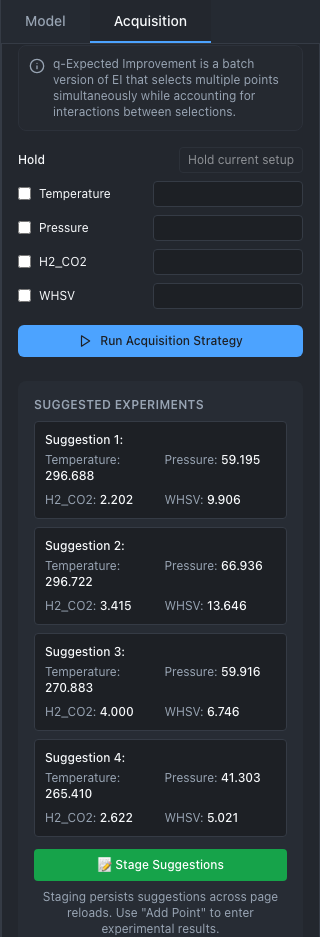
A q-Expected Improvement batch of four on the simulated reactor, after Stage Suggestions: the four points are queued.
1. Get suggestions
- Train a model; see Train a model. The Acquisition tab shows the strategies of the backend the model was trained with. Its controls stay disabled until a model exists.
- In Acquisition Functions, pick a strategy (table below). With BoTorch, first choose Regular, Batch or Exploratory; for Batch, also set Batch Size (q).
- Choose Maximize or Minimize, the direction you want the response to go.
- With BoTorch, optionally keep some variables fixed in the Hold list; see Hold variables.
- Choose Run Acquisition Strategy. Suggested Experiments lists one card per point, with the value of each variable.
- Choose Stage Suggestions. The points join the session's queue and its audit log, and Add Point..., under Experiment Data on the left, shows how many are waiting. Run them, then record the results; see Run and record.
Known issue
W29: the count on Add Point... (under Experiment Data on the left) rises as soon as the suggestions appear, before you choose Stage Suggestions. Until you stage them, those points exist only in the browser: a page reload loses them, and results recorded for them are not linked to the suggestion in provenance. Always choose Stage Suggestions, once.
Strategies
| Panel | Menu entry | strategy |
Points per run | Parameters, defaults |
|---|---|---|---|---|
| BoTorch, Regular | Expected Improvement | EI |
1 | none; it runs as LogEI |
| Log Expected Improvement | LogEI |
1 | none | |
| Probability of Improvement | PI |
1 | none | |
| Log Probability of Improvement | LogPI |
1 | none | |
| Upper Confidence Bound | UCB |
1 | beta=0.5 |
|
| BoTorch, Batch | q-Expected Improvement | qEI |
Batch Size (q), 2 to 10 | mc_samples=128 |
| q-Upper Confidence Bound | qUCB |
Batch Size (q), 2 to 10 | beta=0.5, mc_samples=128 |
|
| BoTorch, Exploratory | Integrated Posterior Variance | qNIPV (or qIPV) |
1; more from Python and REST | n_mc_points=500; ignores the goal |
| scikit-learn | Expected Improvement (EI) | EI |
1 | xi=0.01 |
| Upper Confidence Bound (UCB) | UCB |
1 | kappa=1.96 |
|
| Probability of Improvement (PI) | PI |
1 | xi=0.01 |
|
| GP Hedge (Auto-balance) | gp_hedge |
1 | xi=0.01, kappa=1.96 |
|
| Python and REST, BoTorch | none | qEHVI, qNEHVI |
any | several objectives; see Multi-objective |
The scikit-learn panel sets ξ (xi) with a slider from 0.0001 to 0.1 and κ (kappa) from 0.1 to 5. Strategy names are not case-sensitive: the web app sends logEI where the table shows LogEI.
One point or a batch
EI, LogEI, PI, LogPI and UCB score one point at a time, so they suggest one point. For several points to run in parallel, use Batch: qEI or qUCB choose the points jointly. Asking an analytic strategy for more than one point raises an error that names qEI, qUCB and qIPV (HTTP 400 over REST). The scikit-learn backend suggests one point with any strategy, and asking it for more raises an error.
Which to use
Log Expected Improvement is a good default for one point at a time, and Batch with qEI for several. Upper Confidence Bound explores more as beta grows. Exploratory ignores the goal and places points where the model is most uncertain. How each function trades exploration against improvement is in Acquisition functions.
Known issue
T8: with scikit-learn, every suggestion is a random point until the session has 10 results, and GP Hedge chooses among its three functions at random. Described under Acquisition functions.
2. Hold variables
With BoTorch, a Hold list sits above Run Acquisition Strategy, one row per variable. Tick a variable and type a value to keep it there for this suggestion; the optimizer moves only the others. Hold current setup ticks every hard or very hard variable and fills in the last recorded run's values. Observed (measured) variables appear under Measured now and need a value before every suggestion. The usual use is a furnace or a catalyst bed that is slow to change: see Split-plot designs.
Each BoTorch suggestion also reports a knowledge ratio, near 0 where the data pin the model down and near 1 where it knows nothing. With anything held or measured, a ratio above 0.9 puts a warning on the card. How to read it is under The knowledge ratio.
3. Find the model's optimum
Under Model Prediction Optimum, pick Maximize or Minimize and choose Find Model Optimum. ALchemist searches a grid of about 10,000 points, within any input constraints, for the best predicted value. The result shows the optimal point, the predicted value and its uncertainty (±).
This uses the model's prediction alone, with no allowance for what the model does not know, so trust it only when the diagnostics are good; see Check the model. The optimum is not staged; to record a run there, type its values into a blank point (Run and record). On a multi-objective session it answers 400 (one point cannot describe a Pareto front); see Multi-objective.
From Python or REST
import numpy as np
from alchemist_core import OptimizationSession

rng = np.random.default_rng(5)
session = OptimizationSession()
session.add_variable("temperature", "real", bounds=(200.0, 300.0), unit="°C")
session.add_variable("pressure", "real", bounds=(20.0, 80.0), unit="bar")
for p in session.generate_initial_design("lhs", n_points=12, random_seed=5):
    t = (p["temperature"] - 260) / 50
    q = (p["pressure"] - 55) / 30
    session.add_experiment(p, output=10 - 6 * t**2 - 3 * q**2 + rng.normal(0, 0.2))
session.train_model(backend="botorch")

one = session.suggest_next(strategy="LogEI", goal="maximize")
batch = session.suggest_next(strategy="qEI", goal="maximize", n_suggestions=3)
print(one.round(1).to_dict("records"))
print(batch.round(1))
suggest_next returns a DataFrame with one row per point. Parameters go in as keywords, and a batch needs a q-strategy:
wide = session.suggest_next(strategy="UCB", goal="maximize", beta=2.0)
try:
    session.suggest_next(strategy="EI", n_suggestions=3)
except ValueError as err:
    print(err)

best = session.find_optimum(goal="maximize")
print(best["x_opt"].round(1).to_dict("records"), round(best["value"], 2), round(best["std"], 3))
To queue the batch as Stage Suggestions does, stage each row (Staging and the work queue):
POST /api/v1/sessions/{session_id}/acquisition/suggest
Content-Type: application/json

{"strategy": "qEI", "goal": "maximize", "n_suggestions": 3}
The response holds suggestions, n_suggestions, the iteration to record them under, and diagnostics. The body also takes xi, kappa, hold and observed. Left out, xi and kappa default to 0.01 and 2.0, so scikit-learn UCB over REST uses κ = 2.0, not the 1.96 of Python and the web app. Queue the points with POST .../experiments/queue.
POST /api/v1/sessions/{session_id}/acquisition/find-optimum
Content-Type: application/json

{"goal": "maximize"}
The response holds optimum, predicted_value, predicted_std and goal.
How ALchemist does it
suggest_next in alchemist_core/session.py checks the request, then builds a BoTorchAcquisition or a SkoptAcquisition and optimizes the acquisition function over the search space, within any input constraints. EI builds BoTorch's LogEI, and the improvement baseline is the best posterior mean at the recorded inputs, not the best recorded value. The formulas, the defaults and their sources are in Acquisition functions.