5. Train a model
The model is a Gaussian process fitted to your results. It predicts the response anywhere in the search space, with an uncertainty, and every suggestion is computed from it. This page trains it, explains its settings, and covers retraining when new results come in.
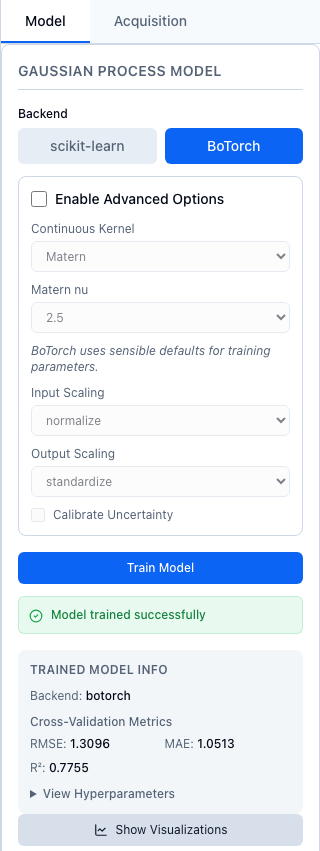
BoTorch trained with its starting settings on the ten simulated design points. The metrics come from cross-validation.
1. Train
- Record at least five results; see Run and record. Train Model stays disabled until then.
- In the right-hand panel, open the Model tab and pick a backend, scikit-learn or BoTorch. The tab starts on scikit-learn. Choose BoTorch unless you need scikit-learn for a reason in the table below.
- To change a setting, tick Enable Advanced Options. The settings are greyed out until you do, but the values they show are the ones sent.
- Choose Train Model. "Model trained successfully" appears, and Trained Model Info shows the backend and the cross-validation RMSE, MAE and R². What those numbers mean is on Check the model.
- View Hyperparameters lists the fitted values, such as the length scales and the noise, as JSON. Show Visualizations opens the diagnostic plots.
Choose a backend
| BoTorch | scikit-learn | |
|---|---|---|
| Suggestions | Every strategy, including batches; see Suggest next | One point at a time, random until the session has 10 results (T8) |
| Input constraints, the Hold list, observed variables | Yes | No: suggesting with constraints raises an error, and observed variables refuse to train |
| Several objectives | Yes; see Multi-objective | No |
| Categorical variables | A mixed kernel for categories | One-hot columns with the ordinary kernel |
Settings
| Setting | BoTorch: choices, starting value | scikit-learn: choices, starting value | Python train_model |
REST model/train |
|---|---|---|---|---|
| Kernel: Continuous Kernel (BoTorch), Kernel Selection (scikit-learn) | RBF, Matern, IBNN (Deep Kernel); Matern |
RBF, Matern, RationalQuadratic; RBF |
kernel= |
kernel |
Matern nu, shown for Matern |
0.5, 1.5, 2.5; 2.5 |
0.5, 1.5, 2.5, inf; 1.5 |
kernel_params={"nu": 2.5}; {"matern_nu": 2.5} for scikit-learn |
kernel_params |
| Input Scaling | none, normalize, standardize; normalize |
none, minmax, standard, robust; none |
input_transform_type= |
input_transform |
| Output Scaling | none, standardize; standardize |
none, minmax, standard, robust; none |
output_transform_type= |
output_transform |
| Calibrate Uncertainty | off | off | calibration_enabled= |
calibration_enabled |
| Optimizer | not shown | CG, BFGS, L-BFGS-B, TNC; L-BFGS-B |
optimizer= |
optimizer |
IBNN (Deep Kernel) adds a depth setting, 1 to 10 and 3 to start, sent as kernel_params={"ibnn_depth": 3}. Python and REST differ from the web app's starting settings in the kernel, which defaults to Matern for both backends. train_model() with no arguments is scikit-learn, Matern with ν = 1.5 and no scaling. backend="botorch" with no transform arguments normalizes inputs and standardizes outputs. Over REST an omitted transform gets the same default, and "none" means none.
For a first model, keep the BoTorch starting settings. Matern with ν = 2.5 assumes a response that is smooth but not perfectly so; a lower ν allows a rougher response, and RBF assumes a very smooth one. Normalizing inputs puts every variable on the same 0 to 1 scale, so a length scale means the same thing for each; standardizing outputs gives the response mean 0 and standard deviation 1, the scale BoTorch's priors expect.
Known issue
F1: Calibrate Uncertainty has no effect. Calibration is computed on every train whether it is ticked or not; see Reading the diagnostics.
Known issue
Two scikit-learn settings do not reach the model. F2: Matern nu from the web app is ignored, and the fitted Matérn always has ν = 1.5; from Python, kernel_params={"matern_nu": ...} works. T21: the inf choice cannot be sent at all. Details are under Gaussian processes.
Retraining after new results
With Retrain model (once, after saving) ticked, saving results in Add Point... retrains the model once, provided the session has at least five results. The retrain reuses the arguments of the last successful training in the session: backend, kernel, kernel parameters, scaling and the calibration flag. They are kept in the session file, so they survive a save and load. Training again from the Model tab replaces them.
If no model has been trained in the session yet, the retrain uses scikit-learn with an RBF kernel and no scaling, the Model tab's starting settings; with observed variables defined it uses BoTorch with an RBF kernel. So train once from the Model tab before you leave the box ticked.
After Join or Load Session, and after every train, the Model tab shows the backend, kernel and scaling the session's model was trained with, so Train Model repeats them unless you change them.
A multi-objective session trains one Gaussian process per objective, BoTorch only, and shows no cross-validation metrics in the web app yet (W25); see Multi-objective.
From Python or REST
import numpy as np
from alchemist_core import OptimizationSession

rng = np.random.default_rng(5)
session = OptimizationSession()
session.add_variable("temperature", "real", bounds=(200.0, 300.0), unit="°C")
session.add_variable("pressure", "real", bounds=(20.0, 80.0), unit="bar")
for p in session.generate_initial_design("lhs", n_points=12, random_seed=5):
    t = (p["temperature"] - 260) / 50
    q = (p["pressure"] - 55) / 30
    session.add_experiment(p, output=10 - 6 * t**2 - 3 * q**2 + rng.normal(0, 0.2))

results = session.train_model(backend="botorch", kernel="Matern", kernel_params={"nu": 2.5})
print({k: round(v, 3) for k, v in results["metrics"].items()})
print(session.get_last_training_config())
The scikit-learn backend takes its ν as matern_nu, and its scaling names differ:
sk = session.train_model(
    backend="sklearn",
    kernel="Matern",
    kernel_params={"matern_nu": 2.5},
    input_transform_type="minmax",
    output_transform_type="standard",
)
print(sk["backend"], round(sk["metrics"]["r2"], 3))
Python does not retrain by itself. After adding results, replay the last configuration:
POST /api/v1/sessions/{session_id}/model/train
Content-Type: application/json

{"backend": "botorch", "kernel": "Matern", "kernel_params": {"nu": 2.5}, "input_transform": "normalize", "output_transform": "standardize"}
The response holds backend, kernel, hyperparameters and metrics (rmse, mae, r2). GET /api/v1/sessions/{session_id}/model returns backend, hyperparameters, metrics and is_trained for the current model. The recording routes, record-batch among them, retrain with ?auto_train=true, which reuses the last configuration. On record-batch, training_backend and training_kernel in the query override it for that retrain.
How ALchemist does it
train_model in alchemist_core/session.py builds a BoTorchModel or a SklearnModel, fits its hyperparameters by maximizing the marginal likelihood, and then runs 5-fold cross-validation for the metrics. What a kernel assumes, how the hyperparameters are fitted and how noise enters are explained in Gaussian processes and kernels; the per-backend details are in its "How ALchemist does it" box. The arguments are listed in the models reference.