
Battery Dispatch FOM#
The Battery Dispatch page displays inputs for controlling the battery dispatch, or timing of battery charging and discharging. For inputs that describe the battery’s performance characteristics, see the Battery Cell and System page.
Charge Limits and Priority#
The Charge Limits and Priority inputs are constraints on the battery dispatch calculations.
The limits on minimum and maximum state of charge affect both the amount of energy available for battery dispatch calculations, and the depth of charge-discharge cycles for battery life calculations. Choose values appropriate for the type of battery you are modeling. The default values state of charge range of 15% to 95% is reasonable for most Li-ion battery types.
- Minimum state of charge, %
A limit on the quantity of energy that can be drained from the battery as a percentage of available capacity. For example, a value of 15% would prevent the battery from discharging below 15% of the battery’s available capacity in a given time step.
Note
The minimum and maximum state of charge are both as a percentage of available battery capacity, which changes over time as the batteries degrade and are replaced. The available capacity in a given time step is likely to be less than the battery’s nominal capacity shown on the Battery Cell and System page.
- Maximum state of charge, %
A limit on the quantity of energy that can be sent to the battery as a percentage of available capacity. For example a value of 95% would prevent the battery from charging above 95% state of charge.
- Initial state of charge, %
The state of charge of the battery at the beginning of the simulation. A value of 100% would be for a fully charged battery, 0% would be for a fully discharged battery.
- Minimum time at charge state, min
There may be periods of time where the photovoltaic or other power system output varies above and below the load causing rapid cycling of the battery. Rapid cycling may also result for dispatch options that respond to power prices when prices change rapidly from time step to time step. This kind of cycling, especially if the cycles are deep, may degrade battery performance over time. The minimum time at charge state prevents the battery from changing between charging and discharging within the number of minutes that you specify.
Note
The minimum time at charge state only applies when the simulation time step is smaller than the minimum time at charge state. For example, the default value of 10 minutes would only apply for 5-minute or 1-minute simulation time steps; It has no effect for hourly simulations.
Front-of-meter (FOM) Storage Dispatch Options#
The battery dispatch options determine when the battery charges and discharges. The charge options determine any limits on how the battery can charge or discharge.
Dispatch Options#
Choose the dispatch option that most closely represents when you want the battery to charge and discharge.
Note
The list below provides a brief description of each option. To see a detailed description of each heading, click the appropriate grey and blue heading below to expand the detailed description.
- Automated dispatch
Automated dispatch dispatches the battery in response to changes in the power price to maximize revenue from power sales. Use this option for PPA projects that involve time-of-delivery price multipliers or Merchant Plant projects.
- PV smoothing
PV smoothing dispatches the battery for photovoltaic-battery systems to limit power ramp rates at the grid interconnection point. Use this option for projects required to meet ramp rate limits. This option is available for PV battery and Custom Generation Profile - Battery systems. It is not available for standalone batteries.
- Dispatch to custom time series
Dispatch the battery according to time series charge and discharge power values you provide. Use this option when you know exactly how you want the battery to charge and discharge.
- Manual dispatch
No automation. You specify the timing of battery charges and discharges manually using up to six dispatch periods and a set of weekday and weekend hourly profiles by month. Use this option when you want the battery to charge and discharge according to daily or seasonal schedules.
Charge Options#
Choose the source of power for charging the battery. SAM enables and disables (greys out) the options as appropriate for the dispatch option and whether the battery is DC- or AC-connected.
- Battery can charge from grid
Allow the grid to charge the battery.
- Battery can charge from system
Allow the system to charge the battery.
- Battery can charge from grid-limited system power
Allow the battery to charge from power in excess of the interconnection limit or from curtailed power when the interconnection limit is enabled and/or curtailment is specified on the Grid Limits page.
This option is designed so that when system power exceeds a grid limit, system power is delivered to the load and/or grid, and only power in excess of the grid limit is used to charge the battery: The battery is only allowed to charge from grid limited power when it is not allowed to charge from the system.
- Battery can charge from clipped system power
For DC-connected batteries with a photovoltaic system, allow DC array power in excess of the inverter’s nominal DC input power to charge the battery.
Automated Dispatch#
SAM’s front-of-meter automated dispatch algorithm attempts to charge and discharge the battery to maximize revenue from power sales to the grid. It calculates a battery power target for each time step, and charges or discharges the battery to attempt to meet the target, given any constraints on battery capacity and battery state of charge, and accounting for power conversion losses. Note that in some time steps, depending on the battery’s state of charge and other constraints, the battery discharge power may be less than the target.
You can explore the results of the automated dispatch by comparing the output variables Electricity battery power target for automated dispatch to Electricity to/from battery. Other useful output variables include Power price for battery dispatch representing the power prices used for battery dispatch calculations, Battery state of charge, Electricity to grid from battery,and Electricity to grid from system (for PV Battery and Custom Generation Profile - Battery configurations).
Automated battery dispatch responds to power prices that vary over time, which can be defined as a PPA price with time-of-delivery multipliers for PPA projects, or market prices for Merchant Plant projects. For batteries connected to a power system (PV Battery and Custom Generation Profile - Battery configurations), battery dispatch also responds to the availability of power from the system. Battery dispatch also accounts for the cost of cycling the battery based on a prediction of how battery cycling will affect battery degradation and replacements.
The automated dispatch options determine the time horizon over which the algorithm maximizes revenue
The automated dispatch algorithms are described in DiOrio, N.; Denholm, P.; Hobbs, W. (2020). A Model for Evaluating the Configuration and Dispatch of PV Plus Battery Power Plants. Applied Energy Vol 262 March 2020, also listed on the SAM website at https://sam.nlr.gov/battery-storage/battery-publications.html.
Note
For power purchase agreement (PPA) financial models, the automated dispatch options require that you choose Specify PPA Price on the Revenue page (Financial Parameters page for Partnership Flip and Sale Leaseback financial models) because the dispatch algorithm needs to know the power price as the simulation runs. For the Specify IRR Target option, SAM does now know the PPA price until the end of the simulation.
Automated dispatch is designed to respond to power prices that change over time. For the PPA financial models, you can specify power price multipliers either using weekday and weekend schedules, or by time step. (Set the PPA price to $1/kWh if you want to use $/kWh price data instead of multipliers, or set it to $0.001/kWh for $/MWh price data.)
The merchant plant financial model may not work well with battery storage systems because of the cleared capacity requirement.
- Perfect look ahead
For each day, charge and discharge the battery based on the available power from the photovoltaic or other power source and power price to maximize revenue. For standalone batteries with no power system, charge and discharge the battery based on the power price.
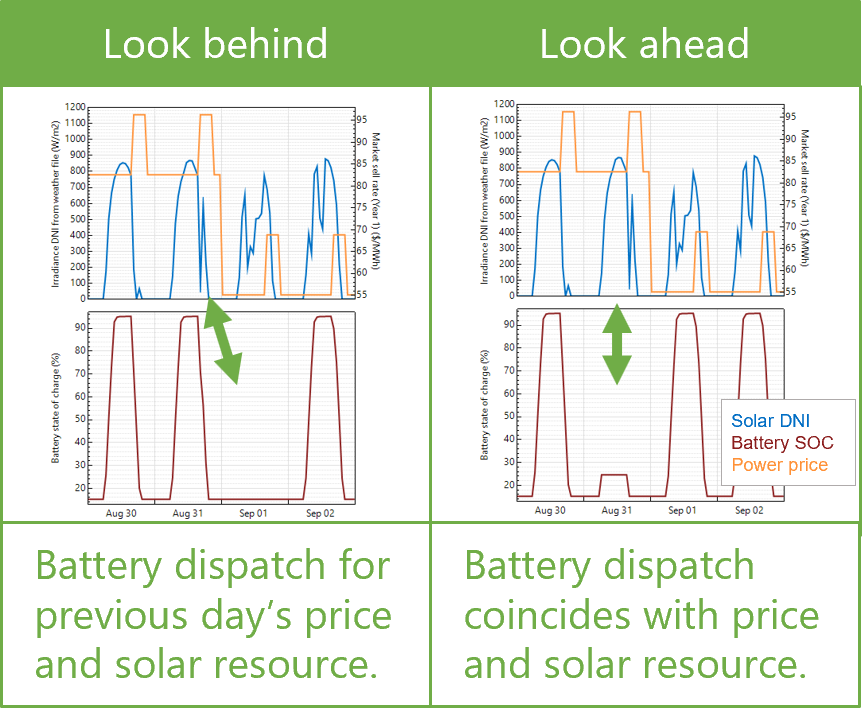
The look-ahead option is a perfect prediction of available power and prices because the battery dispatch coincides with the actual power generation and prices.
- One day look behind
Similar to perfect look ahead, but based on the available power and power prices in the previous 24 hours. The look-behind option adds some uncertainty to the dispatch because the battery dispatch coincides with power generation and prices for the previous day. The following illustration is for behind-the-meter storage with an electric load, but the concept is the same for a front-of-meter battery.
- Custom forecast
Similar to the look ahead automated dispatch option, except use different time series data for the forecast of power available to charge the battery than that used to model the system’s power output:
For the PV Battery configuration, use a different weather file than the one on the Location and Resource page.
For the Custom Generation Profile - Battery configuration, use a different generation profile for the forecast than the generation profile on the Power Plant page.
Note
The custom forecast option is not available for standalone batteries, which do not dispatch in response to a generation profile of a photovoltaic array or other power generating equipment.
- Frequency to update dispatch
For any of the three automated dispatch options, determines how often a new dispatch decision is made.
- Look ahead period
For the Perfect Look Ahead and Look Ahead to Custom Weather file options, the number of hours ahead of the current time step to use for the dispatch decision in the current time step.
- Weather file for automated dispatch
For the PV Battery configuration, the weather file to use for the custom forecast option. Click Browse to choose a weather file in the SAM CSV format .
- Generation profile for automated dispatch
For the Custom Generation Profile - Battery configuration, a time series generation profile (hourly or subhourly) to use for the custom forecast option. Click Edit array to import or paste a generation profile.
Cycle Degradation Penalty#
The cycle degradation penalty represents the future cost of replacing the battery. It allows SAM to account for the battery replacement cost in the battery dispatch decision. For any of the automated dispatch options, choose a method for estimating the cost of cycling the battery:
Calculate automatically if you want SAM to calculate the cost.
Enter penalty to enter a cost per cycle-kWh value.
If you choose the Calculate Automatically option, SAM reports the calculated penalty as Computed cycle degradation penalty in the battery time series results.
- Cycle degradation penalty
When you choose the “enter penalty” option for the cycle degradation penalty option, this is the penalty in $/cycle-kWh of battery total capacity for cycling the battery. You can either enter a single value, or click the blue and grey Value/Sched button to enter a different penalty for each year of the analysis period.
PV Smoothing#
The PV smoothing algorithm dispatches the battery to reduce rapid fluctuations in a photovoltaic-battery system’s output that can occur on partly cloudy days.
Note
The PV smoothing algorithms requires a simulation time step of 15 minutes or smaller. For SAM’s photovoltaic models, the simulation time step is determined by the temporal resolution of the weather file. You can download 15-minute and 5-minute weather data from the NLR National Solar Radiation Database by choosing the Advanced download option on the Location and Resource page, or you can convert data from an hourly weather file to subhourly time steps using the “Solar Resource Interpolation” macro.
When you choose the PV smoothing dispatch option, be sure to check the charge options to allow the battery to charge from the system, grid or both.
Simulations with PV smoothing can take several minutes to run, depending on your computer and the weather file time step.
After running a simulation, you can find results of the PV smoothing algorithm on the Results page Data Tables, Time Series, and other tabs by searching for “pv smoothing.” The relevant results all start with PV smoothing…. PV smoothing outpower is the battery target power for PV smoothing algorithm: It attempts to dispatch the battery to meet the target, but constraints such as battery state of charge may prevent the target from being met in some time steps. Electricity to grid is power delivered by the PV system and/or battery to the grid, which may be subject to grid constraints or AC losses specified on the Battery Cell and System, Grid and Losses pages.
For more information about the algorithm, see:
For an introduction to the PV Smoothing algorithm, see the “Battery Updates for Fall 2021” webinar recording available on the SAM website at https://sam.nlr.gov/battery-storage/battery-videos.html.
The model is based on the EPRI open source project PV Ramp Rate Smoothing available on GitHub.com at epri-dev/PV-Ramp-Rate-Smoothing.
For a description of the model, see Fregosi, D.; Bolen, M.; Hobbs, W. (2023) “An analysis of storage requirements and benefits of short-term forecasting for PV ramp rate mitigation” available from https://sam.nlr.gov/battery-storage/battery-publications.html.
- Weather file time stamp, minutes
The temporal resolution of the currently selected weather file on the Location and Resource page. The PV smoothing algorithm requires a weather file with a time step of 15 minutes or smaller.
- Ramp timestep multiplier
The ramp interval is a multiple of the simulation time step determined by the ramp timestep multiplier. For example, if the simulation time step is 5 minutes, for a ramp interval of 15 minutes, you would enter a ramp timestep multiplier value of 3.
- Ramp interval, minutes
The interval used to calculate the ramp rate. The ramp rate is a change in power from one interval to the next.
Ramp Interval (minutes) = Weather File Times Step (minutes) × Ramp Timestep Multiplier
- Maximum ramp rate, % of nameplate per ramp interval
The maximum change in power allowed from one ramp interval to the next as a percentage of the Nameplate for PV smoothing, or the interconnection limit from the Grid page, whichever is less.
Note
SAM uses the interconnection limit value to calculate the PV smoothing maximum ramp rate even when the interconnection limit on the Grid page is disabled. If you do not want the interconnection limit to affect PV smoothing, enable it and set it to a value much higher than the PV array nameplate capacity, and then disable it.
- Battery resting SOC, %
The battery resting state of charge as a percent of its nameplate capacity.
- Battery energy, kWhac
The battery’s nominal capacity expressed in AC kilowatt-hours, from the Battery Cell and System page.
- Battery power, kWac
The battery’s nominal maximum discharge rate expressed in AC kilowatt-hours, from the Battery Cell and System page.
- Battery round trip efficiency, %
An estimate of the battery’s nominal round-trip efficiency, calculated from Power Converters parameters on the Battery Cell and System page. Note that SAM calculates the battery’s actual round-trip efficiency during simulations and reports it in the Summary tab of the Results page.
For a DC-connected battery:
Battery Round Trip Efficiency (%) = ( DC to DC Conversion Efficiency (%) × Inverter Efficiency Cutoff (%) ) ÷ 100%
For an AC-connected battery:
Battery Round Trip Efficiency (%) = ( AC to DC Conversion Efficiency (%) × DC to AC Conversion Efficiency (%) ) ÷ 100%
- Nameplate for PV smoothing, kWac
The PV array’s nameplate capacity in AC kilowatts, from the System Size page.
- Interconnection limit, kWac
The grid interconnection limit from the Grid page. Used to calculate the maximum ramp rate. See description above.
- Enable AC upper bound
This constraint prevents the output power after PV smoothing from exceeding the AC upper bound that you specify.
- AC upper bound, fraction of nameplate
When you enable AC upper bound, the system’s output is limited to this fraction of Nameplate for PV smoothing.
- Enable AC lower bound
This constraint prevents the system’s output power after PV smoothing from falling below the AC lower bound that you specify.
- AC lower bound, fraction of nameplate
When you enable AC lower bound, the system’s output is
- Correct up-ramp violations
Use PV smoothing to correct ramp violations when power increases from one interval to the next.
- Curtail violations
Curtail up-ramp violations rather than sending excess power to the grid.
- Enable short-term power forecast
Consider future power output in battery dispatch decision.
- Forecasting window, periods of ramp rate intervals
The forecast period when you enable short-term power forecasts.
- Perfect look ahead
For the Enable Short-term Power Forecast option, use the system output in the forecast period for the power forecast.
- Look ahead to custom weather file
For the Enable Short-term Power Forecast option, base the power forecast on a different weather file than the weather file from the Location and Resource page used to simulate the system’s performance.
- Weather file for PV smoothing forecast
For the Look Ahead to Custom Weather File option, the weather file to use for the smoothing forecast. Click Browse to choose a weather file in the SAM CSV format for the forecast. The weather file should have the same time step as the simulation weather file.
Multipliers#
The multipliers are error terms for a PI (proportional plus integral) controller.
- Track PV power multiplier (kp)
Determine how aggressively to PV power. Default is 1.2.
- Return to rest SOC multiplier (ki)
Determine how aggressively to return the battery to its resting state of charge. Default is 1.8.
- Forecast accumulation error multiplier (kf)
Applies to the difference between the power and forecast power for the ramp rate adjustment. Default is 0.3.
- Reset to defaults
Resets the three multipliers kp, ki, and kf to their default values.
Dispatch to Custom Time Series#
For the dispatch to custom time series option, provide a time series of battery power values. SAM attempts to charge and discharge the battery to meet the battery power target values.
- Time series battery power targets
Click Edit array to enter time series battery power values. A negative power value for a time step indicates the battery controller should attempt to charge the battery at the given rate in that time step. A positive power value indicates the battery should discharge.
Note
For standalone batteries, the time step for time series power targets must be the same as the simulation time step, which you can set on the Battery Time Step page.
Manual Dispatch#
For the manual dispatch option, you specify the timing of battery charges and discharges using up to six dispatch periods and a set of weekday and weekend hourly profiles by month under Manual Dispatch.
- Charge from system
For each period that you want to allow the battery to be charged by power from the system, check the box in the Charge from system column. Charge from system is disabled for standalone batteries.
- Charge from grid
For each period that you want to allow the battery to be charged by power from the grid, check the box in the Allow column, and specify the percentage of the battery’s state of charge that can be charged from the grid over the time step in the Rate column.
For example, for hourly simulations, a charge rate of 25% would allow the battery to charge from the grid at 25% of its state of charge at the beginning of the time step over the time step. The purpose of this rate is to avoid damaging the battery by charging it too quickly.
Note
For subhourly simulations, the charge and discharge rates apply to the subhourly time step even though the periods are defined in hours.
If Charge from grid and the discharge option is also checked for a given period, and if in that period the battery state of charge is above the minimum state of charge, the battery discharges until it reaches the minimum state of charge, at which point it starts charging from the grid, either until it reaches the maximum state of charge, or until the time period changes to one that does not allow charging from the grid.
- Discharge to grid
For each period that you want to allow the battery to discharge to the grid, check the box in the Allow column, and specify the percentage of the battery’s state of charge that can be discharged to the grid over the time step in the Rate column.
For example, if Period 3 is the four consecutive hours between 3 pm and 6 pm, the discharge rate is 25%, and the charge limits are 30% and 96%, for an hourly simulation, that would allow up to 25% of the battery state of charge at the beginning of the 3 pm hour to be discharged over the hour. For the 4 pm hour, 25% of the charge at the end of the 3 pm hour would be available, and so on until the end of Period 3. The 25% value would discharge the battery over the full four-hour period. (A 20% value would have the same effect for a 5-hour period, i.e., if Period 3 were between 3 pm and 7 pm.)
For a one-minute simulation, a discharge rate of 25% would allow up to 25% of the available charge to be dispatched every minute over Period 3, so a smaller percentage would be required to allow the battery to discharge over the full four-hour period.
- Weekday and Weekend Schedules
The weekday and weekend schedules determine the hour of day and month of year for each of the up to six dispatch periods. SAM ignores the charge and discharge options for any periods that you do not assign to the weekday or weekend schedules.
To define the hour of day and month of year that each period applies, use your mouse to select a rectangle in the schedule matrix, and use your keyboard to type the period number (1-6). The number you type should appear in the rectangle.
See Weekday Weekend Schedules for a step-by-step description of how to use the schedule matrices.
- Copy Schedules from TOU/TOD Schedules
Use this button to copy the the weekday and weekend schedules from the time-of-delivery (TOD) schedules on the Time of Delivery or Revenue page for front-of-meter (FOM) systems. This option is not available for the Merchant Plant financial model.