
Libraries#
A library is a text file of comma-separated values (CSV) that stores sets of data associated with a SAM input in the libraries folder of your SAM installation folder. SAM displays the library contents in a library browser where you choose an item from the library to populate values of a set of input variables. For example, the detailed photovoltaic model uses a library to store inverter parameters. By choosing an inverter name, you populate the 16 input variables required to specify an inverter using the CEC inverter model.
Note
In addition to the parameter libraries shown in the table below, SAM also creates libraries as temporary files on your computer to store information about your wind and solar resource data files. For more about weather file libraries, see Weather Files and Libraries.
You can find copies of the SAM library CSV files at NatLabRockies/SAM.
Name |
Description |
Model |
Source |
|---|---|---|---|
CEC Inverters |
Photovoltaic inverters |
Detailed photovoltaic |
California Energy Commission |
CEC Modules |
Photovoltaic modules |
Detailed photovoltaic |
California Energy Commission |
Empirical Trough HCEs |
Parabolic trough receivers |
Empirical trough |
NLR |
Empirical Trough Power Cycles |
Power block parameters for parabolic trough |
Empirical trough |
NLR |
Empirical Trough SCAs |
Parabolic trough collectors |
Empirical trough |
NLR |
Marine Energy Tidal Conerter |
Tidal energy converters |
Marine energy - tidal |
NLR |
Marine Energy Wave Converter |
Wave energy converters |
Marine energy - wave |
NLR |
Physical Trough Collectors |
Parabolic trough collectors |
Physical trough |
NLR |
Physical Trough Receivers |
Parabolic trough receivers |
Physical trough |
NLR |
Sandia Modules |
Photovoltaic modules |
Detailed photovoltaic |
Sandia National Laboratories |
SRCC Collectors |
Solar water heating collectors |
Solar water heating |
Solar Rating and Certification Corporation |
TOD Schedules and Factors |
PPA price multipliers |
All PPA financial models |
NLR |
Trough Parasitics |
Parabolic trough parasitic loads |
Empirical trough |
NLR |
Wind Turbines |
Wind turbine power curves |
Empirical trough |
NLR |
Choosing Items from a Library#
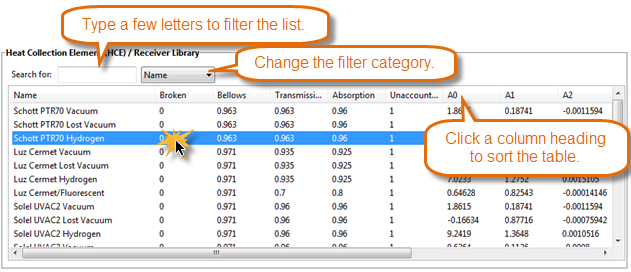
SAM displays library items in a list. To choose an item from the library, click a row in the list. Depending on the input page, SAM either populates the associated input variables with values from the library, or applies the values after you click an Apply Values from Library button.
Modifying Libraries#
For most applications, you do not need to modify libraries. However, if you have reason to modify a library, you can do so by editing the library file with a text editor or spreadsheet program.
Note
If you modify a library, do not change the first three rows of the library file.
Each version of SAM has a separate installation folder. If you modify a library file for one version of SAM, it will only affect that version, and may be deleted when you remove (uninstall) that version.
The library file format is defined as follows:
Library files use the .csv extension and are stored in the Libraries folder in the SAM Installation Folder.
The first row of a library file is a list of the labels describing the input variables stored in the library. SAM displays these labels in the library browser. It does not use these labels in calculations.
The second row is a list of units for each variable in the library that SAM displays in the library browser. SAM does not use the units in calculations.
The third row is a list of SSC variables in the library. Do not change these values because SAM uses them to identify the values in the library.
The fourth row is the set of parameters for the first item in the library.
To add an item to a library:
In the Libraries folder, open the library you want to modify with a text editor or spreadsheet program. Use the table above to find the library’s name.
Add your item after the last row of the library. Be sure to use the same units and conventions as the other items in the library.