
Shading objects#
A shading object is a shape in the shading scene that can block sunlight to create a shadow on active surfaces.
Box#
A box shading object is a rectangular solid with either six sides or four sides. Use it to represent buildings, chimneys, parapets, enclosures, and other structures.
Examples of Box Shading Objects with Properties and in 3D Scene View
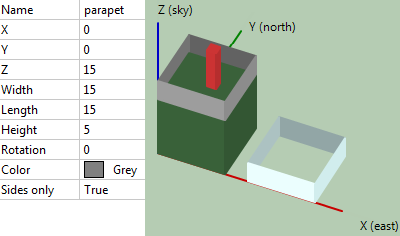
- Name
Descriptive name for the box to you identify it. Does not affect shade analysis.
- X, Y, Z
The X, Y, and Z coordinates of the bottom left corner of the box when the rotation angle is zero.
- Width
The length of the side in the X dimension when the rotation angle is zero.
- Length
The length of the side in the Y dimension when the rotation angle is zero.
- Height
The length of the side in the Z dimension.
Note
The measurements for the size properties of objects (length, width, height, diameter) in the scene can be in any units, as long as you use the same units for all measurements to ensure that the relative size and position of the objects is consistent.
- Rotation
Rotation in the X-Y plane about the origin of the X, Y, and Z axes.
- Color
Color used to render the box in 3D scene, bird’s eye, and elevations view. Does not affect shade analysis. Use different colors when you want to more easily see different boxes in the scene. Type a color name to change the color.
- Sides only
False is a box with six sides. True is a box with no top or bottom, useful for parapets or wall enclosures.
Cylinder#
A cylinder shading object is useful for representing poles, chimneys, some kinds of roof protrusions, and other cylindrical objects.
- A Cylinder Shading Object in 3D Scene View
and its Properties
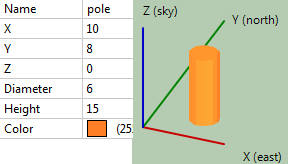
- Name
Descriptive name for the cylinder to you identify it. Does not affect shade analysis.
- X, Y, Z
The X, Y, and Z coordinates of the center of the base of the cylinder.
- Diameter
Diameter of the base of the cylinder.
- Color
Color used to render the cylinder in 3D scene, bird’s eye, and elevations view. Does not affect shade analysis. Type a color name to change the color.
Roof#
The roof shade object represents a hip or gabled roof.
A Roof Shade Object on a Box in 3D Scene View and its properties
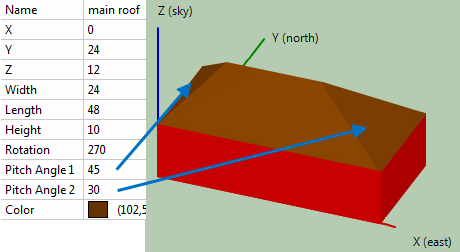
- Name
Descriptive name for the roof to you identify it. Does not affect shade analysis.
- X, Y, Z
The X, Y, and Z coordinates of the bottom left corner of the roof when the rotation angle is zero.
- Width
The length of the side in the X dimension when the rotation angle is zero.
- Length
The length of the side in the Y dimension when the rotation angle is zero.
- Height
The vertical distance from the base of the roof to its peak.
- Rotation
Rotation in the X-Y plane about the origin of the X, Y, and Z axes.
- Pitch Angles 1 and 2
The angle from the horizontal of the two roof surfaces as shown in the image above. A gable would have a pitch angle of 90 degrees.
- Color
Color used to render the roof in 3D scene, bird’s eye, and elevations view. Does not affect shade analysis. Type a color name to change the color.
Tree#
The tree shading object can be used to represent a tree with a variety of crown shapes.
Three Trees in 3D Scene View and the Conical Tree Properties
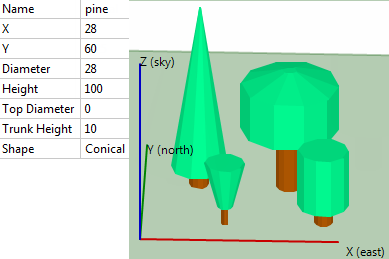
- Name
Descriptive name for the tree to you identify it. Does not affect shade analysis.
- X, Y
The X and Y coordinates of the center of the base of the tree.
- Diameter
For the conical shape, the diameter of the bottom of the tree’s crown. For the rounded shape, the diameter of the cylindrical portion of the crown.
- Height
The distance from the base of the tree truck to the top of the crown.
- Top Diameter
The diameter of the top of the tree’s crown.
- Trunk Height
The distance from the base of the tree to the bottom of the crown.
- Shape
The crown shape. Conical is a versatile shape that you can use for crown shapes like conical, vase, and cylindrical. Rounded is for a crown with a rounded top and bottom.