
System Control#
The System Control inputs determine the operating parameters of the system.
Plant Energy Consumption#
- Fraction of rated gross power consumed at all times, MWe/MWtcap
A fixed electric load applied to all hours of the simulation, expressed as a fraction of rated gross power at design from the System Design page.
- Balance of Plant Parasitic, MWe/MWtcap
Losses as a fraction of the power block nameplate capacity that apply in hours when the power block operates.
- Aux heater boiler parasitic (MWe/MWtcap)
A parasitic load that is applied as a function of the thermal output of the auxiliary fossil-fired heaters.
The BOP and auxiliary heater parasitic at design are calculated as follows:
Parasitic Loss (MWe) = Heat Sink Thermal Power (MWt) × P (MWt/MWtcap) × Factor × ( C0 + C1 × Gross Power Ratio + C2 × Gross Power Ratio² )
Where Gross Power Ratio is calculated in each time step as Gross Output in Time Step (MWt) / Heat Sink Thermal Power (MWt).
System Availability#
System availability losses are reductions in the system’s output due to operational requirements such as maintenance down time or other situations that prevent the system from operating as designed.
Note
To model curtailment, forced outages or reduction in power output required by the grid operator, use the inputs on the Grid Limits page. The Grid Limits page is not available for all performance models. For the PV Battery model, battery dispatch is affected by the system availability losses. For the PVWatts Battery, Custom Generation Profile - Battery, and Standalone Battery models, battery dispatch ignores the system availability losses.
To edit the system availability losses, click Edit losses.
The Edit Losses window allows you to define loss factors as follows:
Constant loss is a single loss factor that applies to the system’s entire output. You can use this to model an availability factor.
Time series losses apply to specific time steps.
SAM reduces the system’s output in each time step by the loss percentage that you specify for that time step. For a given time step, a loss of zero would result in no adjustment. A loss of 5% would reduce the output by 5%, and a loss of -5% would increase the output value by 5%.
Dispatch Optimization#
Dispatch optimization is not available for the IPH Linear Fresnel Molten Salt model in this version of SAM.
Dispatch Control#
The dispatch control periods determine the timing of adjustments to the heat sink output.
Note
If your analysis involves PPA price multipliers defined on the Time of Delivery (TOD) Factors page, you should verify that the dispatch control schedules are consistent with the TOD factor schedules.
- Use output fraction as maximum heat sink output
Check this box if you want to limit the heat sink output to the heat sink output fraction you specify for dispatch control instead of the Heat sink thermal power on the System Design page.
- Use hourly heat sink fraction
Check this box to define output fractions as an array of hourly values, rather than use the weekday and weekend schedule.
- Hourly heat sink fractions
Define the heat sink output fraction for each hour of the simulation
- Heat sink output fraction
For each of up to nine time-of-delivery periods, specify a multiple of the heat sink thermal input to scale the system’s thermal output up or down as desired to match power pricing schedules or other time-dependent constraints.
Defining Dispatch Schedules#
The storage dispatch schedules determine when each of the nine periods apply during weekdays and weekends throughout the year.
To specify a weekday or weekend schedule:
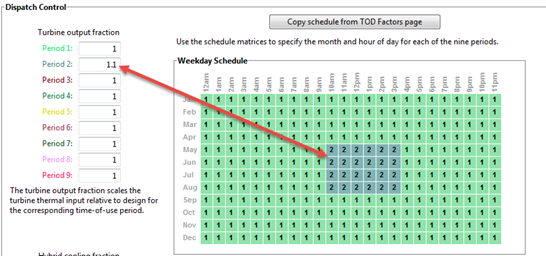
Assign values as appropriate to the Turbine output fraction and Hybrid cooling fraction for each of the up to nine periods.
Use your mouse to draw a rectangle in the matrix for the first block of time that applies to period 2.
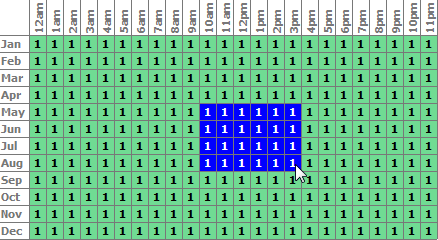
Type the number 2.
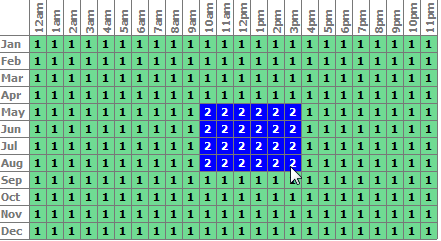
SAM shades displays the period number in the squares that make up the rectangle, and shades the rectangle to match the color of the period.
Repeat Steps 2-4 for each of the remaining periods that apply to the schedule.
Operating Modes#
The system controller reports a set of operating mode outputs indicating how the system operates in each time step. The controller may divide a time step into different operating modes. For example the startup time step may involve three operating modes: Operating Mode 2 as the receiver warms up and the power cycle is off, followed by Operating Mode 32 when the receiver is on and hot HTF is delivered to both the power cycle for startup and TES, and then by Operating Mode 11 when the receiver is on and hot HTF is delivered to both the power cycle for power generation and TES for charging. The controller reports the first three operating modes and the number of modes for each time step. Most time steps will require three or fewer modes. In some rare cases, a time step may require more than three modes.
The operating modes output variables are:
- 1st operating mode
The operating mode at the beginning of the time step.
- 2nd op. mode, if applicable
If the operating mode changes within the time step, the second operating mode follows the first operating mode.
- 3rd op mode, if applicable
If the operating mode changes three times within the time step, the third operating mode follows the second operating mode.
- Operating modes in reporting timestep
The number of operating modes in a given time step.
In each time step, the controller uses an iterative process to search for the operating mode that best achieves target plant output. The target plant output is either determined from the Turbine output fraction for the time step that you specify under Dispatch Control, or, if you check Enable dispatch optimization under Dispatch Optimization, it is automatically optimized. For example, for a time step when the receiver output power is very close to but slightly less than the thermal power required for the power cycle to generate power at the target level, the controller might try Operating Mode 11 where the receiver delivers hot HTF to both the power cycle and TES and determine that is not enough energy to meet the cycle target. The controller would then it try Operating Mode 12 that discharges a small amount of energy from TES to supplement the energy from the receiver and meet the cycle target. If the cycle target is met, the First 3 operating modes tried would be 1112 to represent the controller trying Operating Mode 11 followed by Operating Mode 12.
In most cases, the controller will only need to consider up to three attempts, and it reports up to nine attempts. The output variables indicating operating modes considered by the controller are listed below. Note that modes 1-9 are indicated as 10, 20, 30, … 90.
- First 3 operating modes tried
The numbers of the first of up to three operating modes tested in a given time step to find the best operating mode. For example, if operating modes 11 and 12 were tried, the value would be 1112.
- Next 3 operating modes tried
If the controller tried more than three operating modes, the mode numbers up to three additional attempts.
- Final 3 operating modes tried
If the controller tried more than six operating modes, the mode numbers for up to three additional attempts.
The 34 operating modes are described in the table below. Note that single digit operating modes 1-9 are shown as 10, 20, etc. in the “operating modes tried” variables.
Operating Mode |
Description |
|---|---|
1 (10) |
CR_OFF, PC_OFF, TES_OFF, AUX_OFF |
2 (20) |
CR_SU, PC_OFF, TES_OFF, AUX_OFF |
3 (30) |
CR_ON, PC_SU, TES_OFF, AUX_OFF |
4 (40) |
CR_ON, PC_SB, TES_OFF, AUX_OFF |
5 (50) |
CR_ON, PC_RM_HI, TES_OFF, AUX_OFF |
6 (60) |
CR_ON, PC_RM_LO, TES_OFF, AUX_OFF |
7 (70) |
CR_DF, PC_MAX, TES_OFF, AUX_OFF |
8 (80) |
CR_OFF, PC_SU, TES_DC, AUX_OFF |
9 (90) |
CR_ON, PC_OFF, TES_CH, AUX_OFF |
10 |
SKIP_10 (not used) |
11 |
CR_ON, PC_TARGET, TES_CH, AUX_OFF |
12 |
CR_ON, PC_TARGET, TES_DC, AUX_OFF |
13 |
CR_ON, PC_RM_LO, TES_EMPTY, AUX_OFF |
14 |
CR_DF, PC_OFF, TES_FULL, AUX_OFF |
15 |
CR_OFF, PC_SB, TES_DC, AUX_OFF |
16 |
CR_OFF, PC_MIN, TES_EMPTY, AUX_OFF |
17 |
CR_OFF, PC_RM_LO, TES_EMPTY, AUX_OFF |
18 |
CR_ON, PC_SB, TES_CH, AUX_OFF |
19 |
CR_SU, PC_MIN, TES_EMPTY, AUX_OFF |
20 |
SKIP_20 (not used) |
21 |
CR_SU, PC_SB, TES_DC, AUX_OFF |
22 |
CR_ON, PC_SB, TES_DC, AUX_OFF |
23 |
CR_OFF, PC_TARGET, TES_DC, AUX_OFF |
24 |
CR_SU, PC_TARGET, TES_DC, AUX_OFF |
25 |
CR_ON, PC_RM_HI, TES_FULL, AUX_OFF |
26 |
CR_ON, PC_MIN, TES_EMPTY, AUX_OFF |
27 |
CR_SU, PC_RM_LO, TES_EMPTY, AUX_OFF |
28 |
CR_DF, PC_MAX, TES_FULL, AUX_OFF |
29 |
CR_ON, PC_SB, TES_FULL, AUX_OFF |
30 |
SKIP_30 (not used) |
31 |
CR_SU, PC_SU, TES_DC, AUX_OFF |
32 |
CR_ON, PC_SU, TES_CH, AUX_OFF |
33 |
CR_DF, PC_SU, TES_FULL, AUX_OFF |
34 |
CR_DF, PC_SU, TES_OFF, AUX_OFF |