
Tax Credits and Depreciation#
A tax credit is an amount that is deducted from the project’s income tax. An investment tax credit (ITC) reduces the project’s tax liability in Year One of the cash flow. A production tax credit (PTC) reduces tax liability in years that the project generates power:
Investment tax credits (ITC)
Production tax credits (PTC)
Production Tax Credit (PTC)#
A production tax credit (PTC) reduces the project’s annual tax liability starting in Year One of the cash flow and each subsequent year up to and including the year specified in the term variable. The PTC is a dollar amount per unit of annual electric (or thermal) output. If you specify an escalation rate, SAM increases the annual tax credit amount in years 2 and later in the cash flow by a percentage of the previous year’s credit amount.
To see the effect of the PTC on the cash flow, for the Residential and Commercial financial models, see the federal and state income sections of the cash flow. For the Single Owner and other front-of-meter financial models, see the After-tax Returns section of the cash flow. For the calculated PTC amounts, see the Tax Credits section of the project cash flow.
- Amount, $/kWh ($/MMBtu for IPH)
The amount of the production tax credit as a function of the system’s total electrical output in the first year expressed in dollars per kilowatt-hour of AC output. A zero indicates no tax credit.
- Term, years
The number of years, beginning with year 1 on the project cash flow, that the tax credit applies. For example, a credit with a 10-year term would apply to years 1 through 10 of the project cash flow. A zero indicates no tax credit.
- Escalation, %/year
The annual escalation rate that applies to the tax credit. SAM applies the escalation rate to years 2 and later of the project cash flow . SAM does not apply the inflation rate that you specify on the Financial Parameters page to the PTC. For example, for a tax credit with a ten year term and two percent escalation rate, the tax credit in year 2 would be 2% greater than in year 1, and in year 3, 2% greater than in year 2, and so on.
For both the state and federal PTC, SAM rounds the annual PTC rate in cents/kWh to the nearest 0.1 cent as described in Notice 2010-37 of IRS Bulletin 2010-18 .
Specifying Annual PTC Tax Credit Values#
For the PTC, you can specify the tax credit as either a single value (amount or percentage) that applies to all years in the analysis period defined on the Financial Parameters page, or you can assign a different value to each year in the analysis period using an annual schedule.
Dollar values in the annual schedule are in nominal or current dollars. SAM does not apply inflation or escalation rates to values in annual schedules.
By default, you enter the PTC as a single value. The blue “Value” label on the blue and gray button next to the input variable indicates the single value mode is active for the variable.
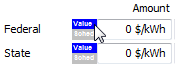
To specify a PTC using an annual schedule:
Click the grey and blue Value/Sched button so Sched is highlighted in blue. SAM replaces the variable’s value with an Edit button.

Click Edit.
Change Number of values to the the analysis period from the Financial Parameters page. The number of rows in the table should be the number of years in the analysis period.
In the table of values, either type a value in each row, or click Paste to paste values from your computer’s clipboard. Row 1 is for Year 1.
To delete a value, select it and press the Delete key on your keyboard.
You must type a value for each year. If you delete a value, SAM will clear the cell, and you must type a number in the cell or SAM will consider the schedule to be invalid. Type a zero for years with no value.
Investment Tax Credit (ITC)#
An investment tax credit (ITC) reduces the project’s tax liability in Year One of the project cash flow. It is calculated based on the portion of the project’s initial investment cost that qualifies for the ITC.
You can specify the ITC as a fixed amount, or as a percentage of the ITC qualifying cost.
In the United States, for projects that qualify for accelerated depreciation, the ITC amount typically reduces the basis used to calculate depreciation for federal tax purposes and for most states.
To see the effect of the ITC on the cash flow, for the Residential and Commercial financial models, see the federal and state income sections of the cash flow. For the Single Owner and other front-of-meter financial models, see the After-tax Returns section of the cash flow. For the calculated ITC amounts, see the Tax Credits section of the project cash flow.
- Amount, $
The fixed dollar amount of the tax credit. A value of zero indicates no tax credit.
- Percentage, %
The amount of the tax credit expressed as a percentage of the ITC qualifying cost. A value of zero indicates no tax credit.
- Maximum, $
The upper limit of the tax credit in dollars. For tax credits with no limits, type the value 1e+038.
- Reduces Depreciation Basis
Available for non-residential projects.
The check boxes determine whether the basis used to calculate federal depreciation, state depreciation, or both should be reduced by the tax credit amount. When you check the box for an ITC, SAM reduces the depreciable basis by 50% of the ITC amount as specified by U.S. Internal Revenue Service rules.
Specifying Annual ITC Values#
You can specify ITC amounts and percentages either as a single value for an ITC that only applies in Year 1, or as annual values that applies over multiple years. By default, you enter the ITC amount or percentage as a single value. The blue “Value” label on the blue and gray button next to the input variable indicates the single value mode is active for the variable:
Dollar values in the annual schedule are in nominal or current dollars. SAM does not apply inflation and escalation rates to values in annual schedules.
If you specify an ITC as annual percentages with a single maximum value, the maximum value applies to all years.
To specify a ITC using an annual schedule:
Click the grey and blue Value/Sched button so Sched is highlighted in blue. SAM replaces the variable’s value with an Edit button.
Click Edit.
Change Number of values to the the analysis period from the Financial Parameters page. The number of rows in the table should be the number of years in the analysis period.
In the table of values, either type a value in each row, or click Paste to paste values from your computer’s clipboard. Row 1 is for Year 1.
To delete a value, select it and press the Delete key on your keyboard.
You must type a value for each year. If you delete a value, SAM will clear the cell, and you must type a number in the cell or SAM will consider the schedule to be invalid. Type a zero for years with no value.
ITC Qualification Options#
SAM provides two options for determining the portion of project costs that qualify for the ITC. The Determine ITC qualification from system components option makes it possible to include only electric battery storage equipment installation costs in the ITC qualifying cost. The Determine ITC qualification from depreciation class allocations determines the ITC qualifying cost from depreciation class allocations and was the only available option for SAM 2025.4.16 and earlier versions.
Note
If you are modeling a system without electric battery storage and choose the ITC qualification from system components option, the ITC qualifying cost is based on the total installed cost.
These ITC qualification options determine what portion of the total installed cost on the Installation Costs page qualifies for state and federal ITC. The federal and state ITC amounts in the project cash flow include other project costs from the Financial Parameters page, including debt-related costs, construction financing cost, and the cost of funding reserves.
- Determine ITC qualification from system components
For systems without storage, choose this option to base the ITC on the total installed cost.
For systems with electric battery storage, you can choose this option to base the ITC on only the battery-related installation costs.
The Non-storage installed cost is the sum of all costs on the Installation Costs page except battery-related costs. The percentage is of the total installed cost on the Installation Costs page. For systems with no battery storage, non-storage installed cost is the same as total installed cost.
The Battery storage installed cost is only visible for systems with electric battery storage (standalone battery, PV-Battery, or hybrid systems with battery storage). It is the sum of battery-related costs on the Installation Costs page: Battery direct cost specified in $/kWh and $/kW of battery DC capacity, battery indirect cost specified as a percent of indirect costs, and portion of sales tax that applies to battery costs. The percentage is of the total installed cost on the Installation Costs page.
For Qualifies for ITC, check the box for each cost (non-storage or battery storage) that qualifies for the ITC for both federal and state tax purposes.
Note
For residential projects, use the Qualifies for ITC check boxes to determine the costs that qualify for the ITC. Depreciation deductions are not available for residential projects, so those inputs are not available for the Residential financial model.
- Determine ITC qualification from depreciation class allocations
Use this option to determine ITC qualifying costs from depreciation class allocations.
For this option, use the inputs under “Depreciation Class Allocations and Bonus Depreciation” to determine ITC qualifying costs. Non-storage installed cost, Battery storage installed cost, and Qualifies for ITC check boxes are disabled.
Depreciation Basis and Allocation#
These inputs allow you to specify how SAM calculates depreciation amounts, and to specify an optional bonus depreciation.
Note
Depreciation Basis and Allocation inputs are not available for the Residential financial model because depreciation deductions are not available for residential projects.
The depreciation basis is the Total depreciation basis prior to allocation output variable. It is the sum of the total installed cost and any financing costs that apply to the project, including debt-related costs, construction financing cost, and the cost of funding reserves.
The depreciation amount for each class is the product of the total depreciation basis prior to allocation and the allocation percentage for that class.
The sum of allocation percentages may be less than 100% to account for situations where the total depreciation basis prior to allocation includes non-depreciable assets or costs. In this case, the total amount allocated for depreciation is less than the total depreciation basis prior to allocation. See the Gross Amount Allocated column in the Depreciation and ITC table in the project cash flow.
For projects with the Investment Tax Credit (ITC), when you check the Reduces Depreciation Basis check box for the ITC under “Investment Tax Credit (ITC)”, SAM reduces the depreciation basis by 50% of the ITC amount as required by U.S. Internal Revenue Service rules.
SAM makes the following simplifying assumptions:
To represent depreciation of assets with different classes or service lives, you can specify an allocation percentage for up to six different depreciation classes.
State and federal depreciation bases are the same, except for bonus depreciation.
Investment-based incentives and capacity-based incentives reduce the depreciation basis proportionally.
Use the following line items in the project cash flow to see the effect of depreciation:
Total federal tax depreciation under “PROJECT FEDERAL INCOME TAXES”.
Total state tax depreciation under “PROJECT STATE INCOME TAXES”.
Depreciable basis prior to allocation on the Data Tables tab of the results page.
Depreciation and ITC table at the bottom of the cash flow.
Depreciation Basis for ITC Qualifying Cost from System Components#
These options are available when you choose Determine ITC qualification from system components under “ITC Qualification Options.”” They are disabled for the Determine ITC qualification from depreciation class allocations option.
- Use federal ITC qualifying cost as depreciation basis
The depreciation basis is the same as the federal ITC qualfying cost shown under Qualifies for ITC under “ITC Qualifying Options.”
- Use state ITC qualifying cost as depreciation basis
The depreciation basis is the same as the state ITC qualfying cost shown under Qualifies for ITC under “ITC Qualifying Options.”
- Depreciation class for ITC qualifying costs
Choose the depreciation class that applies to the ITC qualifying costs shown under “ITC Qualification Options.” If ITC qualifying costs are not allocated to a depreciation class, choose Non-depreciable from the list.
If you chose to use federal ITC qualifying costs as the depreciation basis, at least one of the Federal check boxes must be checked for Qualifies for ITC under “ITC Qualification Options”. Similarly, if you chose to use state ITC qualifying costs as the depreciation basis, check the appropriate State check boxes.
- Depreciation class for non-ITC qualifying costs
Choose the depreciation class that applies to costs that do not qualify to the ITC. If non-ITC qualifying costs are not allocated to a depreciation class, choose Non-depreciable from the list.
Note
If your project qualifies for bonus depreciation, check the appropriate boxes for Qualifies for Bonus Depreciation under “Depreciation Class Allocations and Bonus Depreciation.” See below for details.
Depreciation Class Allocations and Bonus Depreciation#
These options are available when you choose Determine ITC qualification from depreciation class allocations under “ITC Qualification Options.”” They are disabled for the Determine ITC qualification from system components option.
- Depreciation Classes
Each row in the Depreciation Classes box represents a recovery period (5, 15, 20, or 39 years) and depreciation method (MACRS or Straight Line) based on the guidelines in the United States tax code. See U.S. Internal Revenue Service Publication 946 (https://www.irs.gov/pub/irs-pdf/p946.pdf) for details.
The following table shows the depreciation percentage by year for each depreciation class:
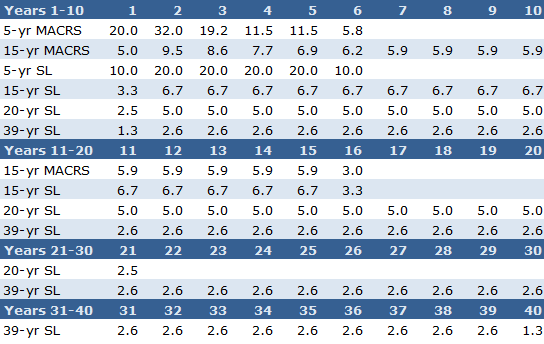
Each depreciation class has an associated value or set of check boxes listed under Allocation Inputs and Qualifies for ITC.
- Custom
For projects outside of the U.S., or for analyses involving depreciation methods other than IRS methods, you can specify a custom depreciation schedule. To specify a custom depreciation schedule, click Edit, and enter a percentage for each year in the depreciation schedule table. (Enter values in the table as percentages, not decimals: For example type ‘25’ for 25%.)
- Allocation Inputs
For each depreciation class, specify an allocation. SAM assumes that the same depreciation method and allocations apply to both federal and state taxes.
SAM assumes the half-year convention for all depreciation methods.
To model a project with no depreciation, enter zero for all depreciation methods.
- Qualifies for ITC
Check the box for each depreciation class that qualifies for investment tax credits (ITC). For example, if you check the box for 5-yr MACRS, and the 5-yr MACRS allocation is 90%, then the ITC basis would be 90% of the total depreciation basis prior to allocation.
- Applied Allocations
These are the depreciation class allocations that SAM uses for cash flow calculations.
If you chose Determine ITC qualification from system components under “ITC Qualifying Options,” these percentages are determined from the Depreciation Basis for ITC Qualifying Cost from System Components options.
If you chose Determine ITC qualification from depreciation class allocations under “ITC Qualifying Options,” these percentages are the values you entered under Allocation Inputs.
- Qualifies for Bonus Depreciation
Bonus depreciation allows the project to take all of the depreciation as a deduction in year one instead of taking it over the recovery period. For example, if a 100% bonus deprecation applies to 5-yr MACRS, the depreciation deduction for that class applies in Year 1 of the project cash flow instead of over Years 1-5.
If the project qualifies for federal or state bonus depreciation, specify a state and/or federal percentage, and then check the box for each depreciation class that qualifies for the bonus depreciation.
For example, for a federal bonus depreciation that is 100% of the 5-yr MACRS depreciation class, if you specified the following depreciation allocations: 80% 5-yr MACRS, 1.5% 15-yr MACRS, and 3% 15-yr Straight Line, you would enter 100% for Federal, check the 5-yr MACRS box, and clear the remaining boxes.
Note
Bonus depreciation does not apply to a depreciation class if the applied allocation for that class is zero.